
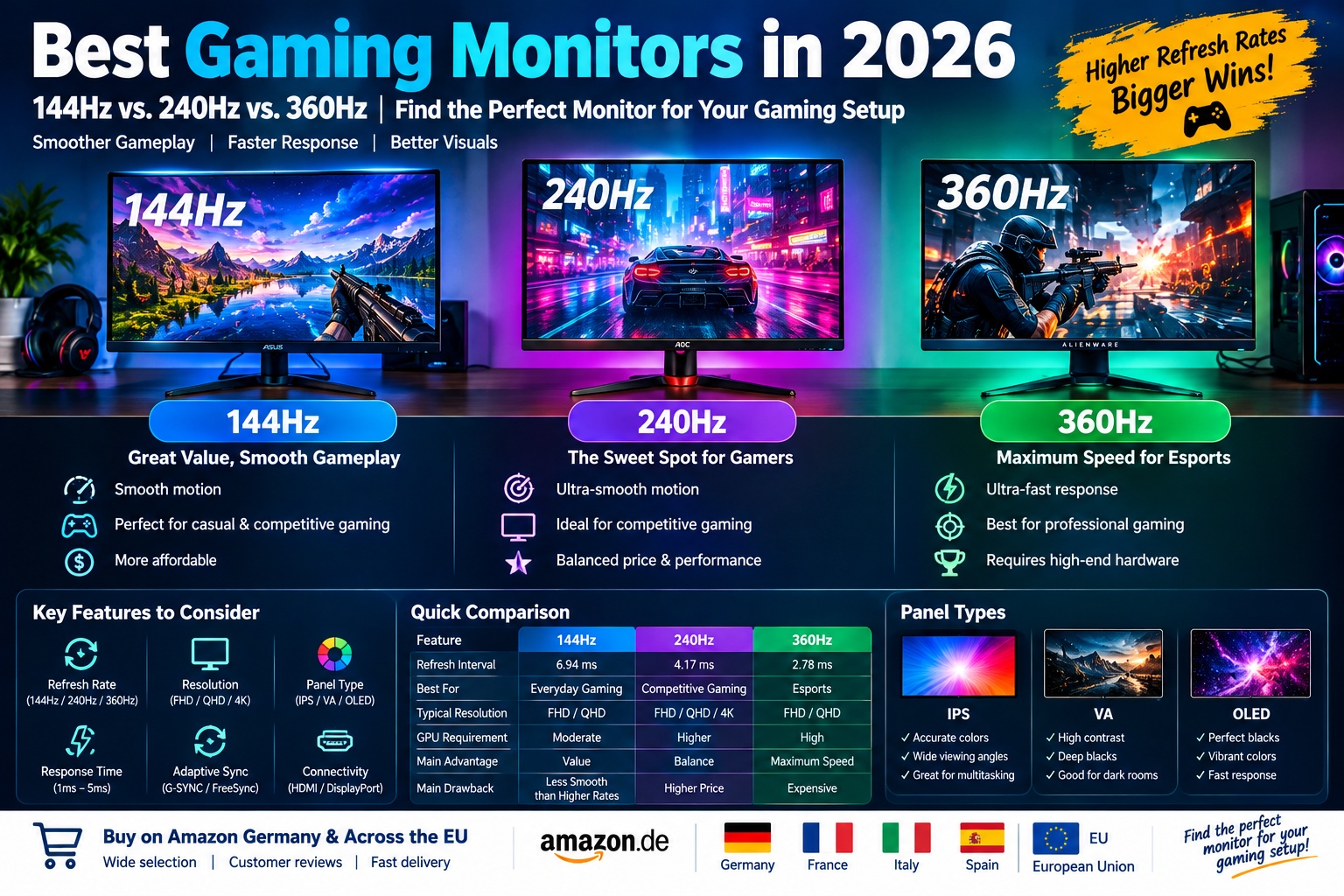
Best Gaming Monitors in 2026: 144Hz vs. 240Hz vs. 360Hz
How to Choose the Best Gaming Monitor in 2026
Choosing one of the best gaming monitors in 2026 can significantly improve your gaming experience. A good monitor delivers smooth motion, responsive controls, sharp images, and accurate colors. However, with refresh rates ranging from 144Hz to 240Hz and 360Hz or higher, selecting the right display can be confusing, especially when different models also offer Full HD, QHD, 4K, IPS, VA, and OLED technologies.
The best gaming monitor depends on your budget, graphics card, favorite games, and preferred resolution. A 144Hz monitor is an excellent starting point for many PC gamers, while a 240Hz display is attractive for competitive players who want smoother motion and lower refresh intervals. A 360Hz monitor is designed for players who prioritize extremely fast gameplay, particularly in esports titles where every millisecond can matter. However, a higher refresh rate does not automatically guarantee a better overall monitor. Resolution, pixel response time, contrast, adaptive sync, and image quality are equally important factors to consider.
This guide compares 144Hz, 240Hz, and 360Hz gaming monitors, explains their advantages and disadvantages, and provides Amazon Germany and European shopping links to help you find a display that suits your needs.
1. Understanding Gaming Monitor Refresh Rates
A monitor’s refresh rate, measured in hertz (Hz), indicates how many times its display can refresh each second. A 144Hz monitor can refresh up to 144 times per second, a 240Hz monitor up to 240 times per second, and a 360Hz monitor up to 360 times per second.
Higher refresh rates can make motion appear smoother and help reduce the time between displayed frames. At 144Hz, each refresh interval is approximately 6.94 milliseconds. At 240Hz, it drops to approximately 4.17 milliseconds, while 360Hz reduces it to around 2.78 milliseconds. These figures describe refresh intervals, not total system input lag or guaranteed response times.
The benefits depend on the games you play and how many frames your computer can produce. If your PC consistently delivers high frame rates in competitive games, a faster monitor may help you see motion more clearly and react more comfortably. If your graphics card struggles to produce enough frames, you may not fully benefit from a 240Hz or 360Hz display.
Before choosing a monitor, consider both its specifications and your PC’s capabilities. A well-balanced 144Hz or 240Hz display can offer better overall value than an expensive 360Hz model paired with hardware that cannot take advantage of its speed.
2. Best 144Hz Gaming Monitors in 2026: Affordable Performance for Most Players
A 144Hz gaming monitor remains a sensible choice for players who want smooth gameplay without spending too much. Compared with a traditional 60Hz display, a 144Hz monitor can provide a noticeable improvement in motion smoothness and responsiveness, particularly in racing games, shooters, sports games, and other fast-moving titles.
Many 144Hz and similarly priced 165Hz or 180Hz monitors offer Full HD or QHD resolutions, IPS or VA panels, adaptive sync, and gaming-focused settings. These features make them suitable for a broad range of users, from beginners building their first gaming setup to experienced players who prefer single-player adventures and visually detailed games.
Recommended 144Hz-Class Gaming Monitor: AOC 24G4XE
The AOC 24G4XE is worth considering when shopping for an affordable gaming display. It belongs to the Full HD, high-refresh-rate category and is designed for players who want responsive gameplay without moving into premium monitor pricing. Depending on the exact regional listing, buyers should verify the supported refresh rate, panel specifications, connectivity, and stand adjustments before purchasing.
A 24-inch Full HD screen can be a practical size for competitive gaming because it allows players to view the entire display without excessive eye movement. The relatively modest resolution also places less demand on the graphics card than QHD or 4K, making it easier to achieve high frame rates with suitable hardware.
Key features to look for:
- A Full HD resolution of 1920 × 1080.
- A refresh rate of at least 144Hz.
- Low pixel response times to reduce visible motion smearing.
- Adaptive sync support to help reduce screen tearing.
- DisplayPort and HDMI connectivity.
- A stand with useful tilt and ergonomic adjustments.
Main advantages: Affordable pricing, relatively low GPU requirements, smooth gameplay, and suitability for competitive and everyday gaming.
Potential disadvantages: Full HD is less detailed than QHD or 4K, and entry-level monitors may have more limited HDR performance or ergonomic adjustments.
Amazon Germany: Shop 144Hz gaming monitors on Amazon Germany
Amazon France: Shop 144Hz gaming monitors on Amazon France
Amazon Italy: Shop 144Hz gaming monitors on Amazon Italy
Amazon Spain: Shop 144Hz gaming monitors on Amazon Spain
3. Best 240Hz Gaming Monitors in 2026: The Sweet Spot for Competitive Gaming
For many serious PC gamers, 240Hz offers an attractive balance between speed, image quality, and price. Compared with 144Hz, a 240Hz monitor can display new frames more frequently, which may make fast movement appear smoother and help improve the clarity of rapidly changing scenes when the panel has good response performance.
A 240Hz display is especially useful for competitive games such as Counter-Strike 2, Valorant, Fortnite, and other fast-paced titles. It can also be a strong choice for players who want to combine competitive gaming with visually rich single-player games, especially when selecting a QHD or OLED model.
A 240Hz monitor is not limited to Full HD. Many current displays combine 240Hz with 2560 × 1440 QHD resolution, and some premium models offer 4K at 240Hz. These higher-resolution options provide sharper images but require more powerful hardware to run demanding games at high frame rates.
Recommended 240Hz-Class Gaming Monitor: Samsung Odyssey OLED G8
The Samsung Odyssey OLED G8 family includes high-end gaming displays designed to combine high refresh rates with strong contrast and fast pixel transitions. Specifications vary by model, so check the exact product number before buying. Some versions offer QHD resolution, while others provide 4K resolution and a 240Hz refresh rate.
OLED technology allows each pixel to control its own light output. This can deliver deep blacks, excellent contrast, vibrant colors, and fast pixel transitions. These qualities make OLED monitors appealing for both competitive gaming and visually immersive single-player experiences.
A premium OLED monitor can be particularly attractive if you want more than high frame rates. It can also improve the appearance of dark scenes, colorful environments, and cinematic games. However, OLED displays generally cost more than many conventional IPS models, and buyers should understand the manufacturer’s advice regarding static images, panel maintenance, and burn-in protection.
Key features to look for:
- A refresh rate of 240Hz.
- QHD or 4K resolution, depending on your budget and graphics card.
- OLED or QD-OLED technology for strong contrast and fast pixel transitions.
- Adaptive sync support.
- Suitable DisplayPort or HDMI connectivity.
- Warranty terms that clearly explain OLED burn-in coverage.
Main advantages: Smooth competitive gameplay, excellent motion performance, impressive contrast on OLED models, and a strong balance between speed and image quality.
Potential disadvantages: OLED models can be expensive, and sustained high frame rates require capable PC hardware. OLED users should also follow the manufacturer’s recommendations for panel care.
Amazon Germany: Shop 240Hz gaming monitors on Amazon Germany
Amazon France: Shop 240Hz gaming monitors on Amazon France
Amazon Italy: Shop 240Hz gaming monitors on Amazon Italy
Amazon Spain: Shop 240Hz gaming monitors on Amazon Spain
4. Best 360Hz Gaming Monitors in 2026: Maximum Speed for Esports Players
A 360Hz gaming monitor is designed for players who prioritize speed and responsiveness above almost everything else. At this refresh rate, the monitor can refresh approximately every 2.78 milliseconds, creating a higher ceiling for displaying new frames than 144Hz or 240Hz displays.
This category is particularly relevant to competitive players who spend many hours playing fast-paced shooters and esports titles. When a PC can produce very high frame rates, a quality 360Hz display may provide smoother motion and more frequent visual updates. The difference between 240Hz and 360Hz is generally less dramatic than the difference between 60Hz and 144Hz, so the value of upgrading depends on your skill level, games, hardware, and budget.
Recommended 360Hz Gaming Monitor: Alienware AW2725DF
The Alienware AW2725DF is a high-end 27-inch QD-OLED gaming monitor offering QHD resolution and a refresh rate of up to 360Hz. Its combination of a fast refresh rate and OLED contrast makes it an attractive option for players who want both competitive performance and premium image quality.
The 2560 × 1440 resolution provides more detail than Full HD on a similarly sized screen, while QD-OLED technology delivers deep blacks, vivid colors, and fast pixel transitions. The display is aimed at gamers with powerful PCs who want to combine high frame rates with an immersive visual experience.
Before buying, verify the supported refresh rates for each connection. Maximum refresh rate and available features can differ between DisplayPort and HDMI, so use the connection specified in the manufacturer’s documentation to achieve the intended performance.
Key features:
- 27-inch screen size.
- QHD resolution of 2560 × 1440.
- Up to 360Hz refresh rate.
- QD-OLED panel technology.
- Fast pixel transitions and high contrast.
- Gaming-focused connectivity and adaptive sync features, depending on the specification.
Main advantages: Extremely smooth motion, detailed QHD images, excellent OLED contrast, and suitability for competitive games and immersive titles.
Potential disadvantages: Premium pricing, the need for a powerful PC to benefit fully from 360Hz, and the need to consider OLED care and warranty conditions.
Amazon Germany: Shop 360Hz gaming monitors on Amazon Germany
Amazon France: Shop 360Hz gaming monitors on Amazon France
Amazon Italy: Shop 360Hz gaming monitors on Amazon Italy
Amazon Spain: Shop 360Hz gaming monitors on Amazon Spain
5. 144Hz vs. 240Hz vs. 360Hz: Which Gaming Monitor Is Best?
The best refresh rate depends on your priorities rather than the highest number printed on the product box. A 144Hz display is a strong value choice for everyday gaming, a 240Hz monitor suits many competitive players, and a 360Hz model is best reserved for people who can benefit from its extra speed.
144Hz: Best for Budget-Conscious Gamers
A 144Hz monitor is ideal if you want to upgrade from 60Hz without spending a large amount. It can deliver smooth gameplay in many popular games and is easier to pair with an entry-level or mid-range graphics card. For players who mainly enjoy single-player games, casual multiplayer, and general computer use, a good 144Hz display can provide excellent value.
240Hz: Best for Competitive Gaming and All-Round Performance
A 240Hz monitor is a strong choice for players who regularly play competitive games and want additional smoothness over 144Hz. It is also a good option for gamers who want modern features such as QHD resolution, OLED contrast, and fast response times. If your PC can maintain high frame rates, 240Hz is often a practical balance between price and performance.
360Hz: Best for Serious Esports Players
A 360Hz monitor is aimed at enthusiasts and competitive players who want very high refresh rates. It can be useful when playing fast esports titles on a PC that consistently produces very high frame rates. However, the extra cost may be difficult to justify for casual players or people whose systems rarely reach the frame rates needed to benefit fully.
Quick Comparison
| Feature | 144Hz Monitor | 240Hz Monitor | 360Hz Monitor |
|---|---|---|---|
| Refresh interval | About 6.94 ms | About 4.17 ms | About 2.78 ms |
| Best for | Everyday gaming and value | Competitive and all-round gaming | Serious esports |
| Typical resolution options | Full HD and QHD | Full HD, QHD, and selected 4K models | Full HD and QHD, with model-dependent options |
| PC requirements | Moderate | Higher for consistently high frame rates | High for fully exploiting the refresh rate |
| Main advantage | Excellent value | Strong balance of speed and image quality | Very high refresh-rate headroom |
| Main drawback | Less motion headroom than faster displays | Costs more than many 144Hz models | Higher price and diminishing returns for many players |
These categories are general guidelines rather than strict rules. A high-quality 240Hz IPS monitor may be a better purchase than a low-quality 360Hz monitor, and a sharp QHD display may suit your needs better than a faster Full HD panel. Always compare the complete specification.
6. Resolution Matters: Full HD, QHD, or 4K?
Refresh rate is only one part of a gaming monitor’s performance. Resolution also determines how detailed the image appears, and the right combination depends on your screen size, graphics card, and favorite games.
Full HD: 1920 × 1080
Full HD remains a practical choice for budget gaming and competitive esports. It requires less graphics processing power than higher resolutions, making it easier to achieve high frame rates. A 24-inch Full HD monitor is particularly popular for players who prioritize speed and affordability over maximum image detail.
QHD: 2560 × 1440
QHD, also called 1440p, offers a sharper image than Full HD and is a popular choice for 27-inch gaming monitors. It provides a good balance between detail and performance, especially when paired with a capable mid-range or high-end graphics card. QHD is available with many 144Hz, 240Hz, and 360Hz displays.
4K: 3840 × 2160
4K provides a highly detailed image and is attractive for cinematic games, large screens, and users who also work with photos or video. However, rendering games at 4K requires significantly more GPU power than rendering at Full HD. A 4K 240Hz monitor is a premium option, and reaching very high frame rates at native 4K resolution can be demanding in modern games.
For many players, QHD at 240Hz is a compelling compromise between speed and sharpness. Competitive players with a limited budget may prefer Full HD at a high refresh rate, while enthusiasts who prioritize image detail may choose 4K and accept lower frame rates in demanding titles.
7. IPS vs. VA vs. OLED: Which Panel Technology Should You Choose?
The panel technology affects contrast, color reproduction, response performance, and the way a gaming monitor looks in different lighting conditions.
IPS Panels
IPS monitors are popular because they offer good color reproduction and wide viewing angles. Many modern IPS gaming displays also provide high refresh rates and fast pixel response. They are versatile choices for competitive gaming, general use, and content creation, although contrast and black levels are usually less impressive than those of OLED panels.
VA Panels
VA panels often provide higher native contrast than conventional IPS displays, which can help dark scenes appear deeper in a dim room. They are available in many affordable gaming monitors, including curved models. However, some VA panels can show noticeable dark-level smearing in fast-moving scenes, so it is important to check independent reviews of the specific model.
OLED and QD-OLED Panels
OLED gaming monitors can deliver deep blacks, excellent contrast, vibrant colors, and extremely fast pixel transitions. They are available in premium high-refresh-rate models and can provide an impressive experience in both competitive and cinematic games.
The main considerations are price and long-term panel care. OLED technology can be susceptible to permanent image retention or burn-in under certain usage patterns, particularly when static elements remain visible for long periods. Modern displays may include protective features, but buyers should read the manufacturer’s guidance and warranty terms carefully.
8. Important Features to Check Before Buying a Gaming Monitor
Response Time
Response time describes how quickly a pixel changes from one state to another. A fast response time can reduce visible ghosting and smearing, but manufacturers may use different testing methods to advertise their numbers. Look for independent reviews that measure real-world pixel transitions rather than choosing a monitor solely because it claims an extremely low millisecond rating.
Adaptive Sync: FreeSync and G-SYNC Compatibility
Adaptive sync helps a monitor coordinate its refresh rate with the frame rate produced by the graphics card. This can reduce screen tearing and help provide smoother gameplay when frame rates fluctuate. Check whether the monitor supports AMD FreeSync, NVIDIA G-SYNC compatibility, or another suitable adaptive sync implementation for your hardware.
HDMI and DisplayPort
The available connections determine which resolutions and refresh rates the monitor can support. Some models deliver their maximum refresh rate only through DisplayPort, while others support high refresh rates through HDMI as well. Check the monitor manual and graphics card specifications to confirm that the selected cable and port can support the resolution and refresh rate you want.
Ergonomic Adjustments
A good monitor should be comfortable to use for long gaming sessions. Height adjustment, tilt, swivel, and pivot features can help you position the screen correctly. If a monitor has a basic stand, check whether it supports a VESA mount so you can add a monitor arm later.
HDR Performance
HDR can improve highlights, brightness variation, and visual impact in supported games, but not all monitors provide the same HDR experience. A monitor advertising HDR support may not have the brightness or local dimming needed for impressive results. Check independent measurements and reviews if HDR image quality is important to you.
Screen Size and Aspect Ratio
A 24-inch screen is a common choice for Full HD competitive gaming, while 27-inch monitors are popular for QHD. Larger 32-inch screens can be attractive for 4K gaming and immersive experiences. Ultrawide monitors provide a wider field of view in supported games, but their aspect ratio may not be ideal for every competitive title.
9. How to Choose the Best Gaming Monitor for Your PC
Before buying a gaming monitor, consider the graphics card installed in your computer. A high-refresh-rate monitor can display more frames, but your PC must produce those frames for you to benefit fully. Check benchmarks for the games you play and compare expected performance at the resolution you intend to use.
If you own an entry-level graphics card, a Full HD 144Hz or 180Hz monitor may offer better value than a premium 360Hz model. If you have a powerful mid-range PC, a QHD 240Hz display may provide a strong combination of detail and speed. Enthusiasts with high-end graphics cards may consider QHD at 360Hz or a premium 4K high-refresh-rate monitor, depending on their preferred games.
You should also think about how you use your computer outside gaming. An IPS monitor may be a versatile choice for productivity and everyday work, while OLED can be appealing for rich contrast and media consumption. If you frequently use static desktop applications for many hours, consider OLED care recommendations and compare them with the advantages of an IPS or VA alternative.
Finally, establish a budget before comparing products. Spend on the features that will make the biggest difference to your experience, whether that means a higher refresh rate, better resolution, improved contrast, or an adjustable stand.
10. How to Buy Gaming Monitors on Amazon Germany and Across the EU
Amazon Germany is a useful place to compare gaming monitors from brands such as ASUS, AOC, Samsung, LG, MSI, Acer, and Alienware. Amazon France, Italy, and Spain can provide additional listings and sometimes different prices or configurations. The exact stock, price, delivery options, and warranty terms vary by country and seller.
Use specific search terms to narrow your options. Examples include “144Hz gaming monitor 24 inch,” “240Hz QHD gaming monitor,” “360Hz OLED gaming monitor,” and “27 inch 1440p gaming monitor.” Read the full product description and check the precise model number because similar product names may refer to displays with different refresh rates, resolutions, or panel technologies.
Before purchasing, confirm that the monitor supports your preferred resolution and refresh rate through the connection you intend to use. Review the warranty, return policy, seller reputation, and customer feedback. For OLED displays, pay particular attention to panel-care guidance and burn-in warranty coverage. If buying from another EU marketplace, confirm delivery eligibility and the final price, including any shipping costs.
The following links open product searches rather than guarantee a specific offer. Prices and availability can change, so compare the current listings before making a decision.
Amazon Germany: Browse gaming monitors on Amazon Germany
Amazon France: Browse gaming monitors on Amazon France
Amazon Italy: Browse gaming monitors on Amazon Italy
Amazon Spain: Browse gaming monitors on Amazon Spain
11. Frequently Asked Questions About Gaming Monitors in 2026
Is 144Hz Enough for Gaming in 2026?
Yes. A 144Hz monitor can provide smooth gameplay and is a good choice for many casual and competitive gamers. It is particularly attractive for buyers who want a noticeable improvement over 60Hz without paying for a premium high-refresh-rate display.
Is 240Hz Better Than 144Hz?
A 240Hz monitor can display frames more frequently than a 144Hz monitor, which may provide smoother motion and improved responsiveness in games that run at high frame rates. Whether the difference justifies the price depends on your games, PC performance, and personal preferences.
Is a 360Hz Monitor Worth Buying?
A 360Hz monitor can be worthwhile for competitive players who regularly achieve very high frame rates in fast-paced games. For casual gaming, a good 144Hz or 240Hz display may offer better value, especially if the additional money can be spent on a stronger graphics card or a higher-quality panel.
Do I Need 360 FPS to Benefit From a 360Hz Monitor?
To fully take advantage of a 360Hz refresh rate, your PC needs to deliver very high frame rates. You can still use the monitor at lower frame rates, but you will not receive the full benefit of its maximum refresh rate. Actual performance also depends on frame pacing, response times, and other system factors.
Is QHD Better Than Full HD for Gaming?
QHD provides more detail than Full HD and is especially appealing on 27-inch monitors. However, QHD requires more graphics processing power to reach the same frame rate. Full HD can be the better choice for budget systems and players who prioritize extremely high frame rates over image detail.
Are OLED Gaming Monitors Better Than IPS Monitors?
OLED monitors generally offer deeper blacks, stronger contrast, and very fast pixel transitions. IPS monitors can be more affordable, provide good color reproduction, and avoid the same type of OLED burn-in concern. The better option depends on your budget, usage habits, and priorities.
What Is the Best Refresh Rate for a Gaming Monitor?
For many buyers, 144Hz offers excellent value, 240Hz is a strong all-round choice for competitive gaming, and 360Hz is best for enthusiasts who prioritize speed. The right option depends on your PC’s performance, the games you play, your budget, and whether you value image quality or maximum refresh rate more.
Conclusion: Choosing the Best Gaming Monitor in 2026
The best gaming monitor in 2026 is not necessarily the one with the highest refresh rate. A 144Hz display offers excellent value for budget-conscious players, a 240Hz monitor provides a compelling balance between smooth gameplay and image quality, and a 360Hz monitor is designed for competitive enthusiasts who can take advantage of extremely high frame rates.
Before purchasing, compare refresh rate, resolution, panel technology, response performance, adaptive sync, and connectivity. Match the monitor to your graphics card and preferred games, and consider whether you would benefit more from a faster display, sharper resolution, or better contrast. By comparing current listings on Amazon Germany and other EU stores, you can find a gaming monitor that fits your budget and delivers the performance and visual quality you want.


