
Best PC Gaming Controllers in 2026: Top Gamepads for Every Gamer
Finding the Best PC Gaming Controllers in 2026
Choosing the best PC gaming controllers in 2026 can significantly improve your gaming experience, especially when playing racing games, action adventures, sports simulations, fighting games, and platformers. Although a keyboard and mouse remain excellent for many PC games, a good controller offers comfortable handling, intuitive button layouts, and precise analog movement in games designed around gamepad controls.
Modern PC gaming controllers offer more than traditional buttons and thumbsticks. Many models feature wireless connectivity, customizable controls, programmable rear buttons, advanced vibration, motion sensors, and magnetic thumbstick technology designed to reduce the risk of stick drift.
Whether you need an affordable wired controller, a premium wireless gamepad, or a competitive controller with additional buttons, there are plenty of options to consider.
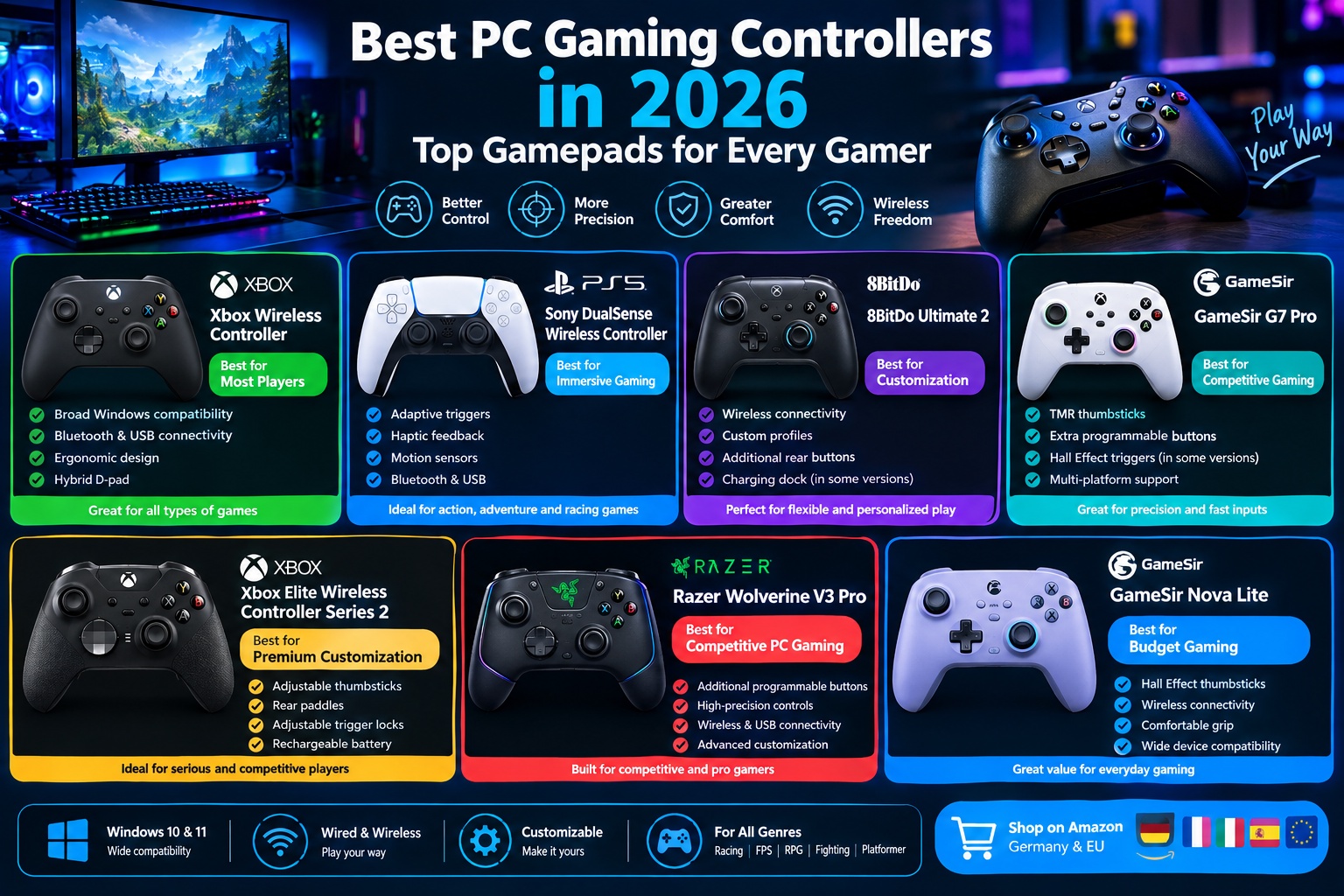
In this guide, we explore the best PC gaming controllers in 2026, including the Xbox Wireless Controller, Sony DualSense, 8BitDo Ultimate 2, GameSir G7 Pro, Xbox Elite Wireless Controller Series 2, Razer Wolverine V3 Pro, and GameSir Nova Lite.
We will compare their features, advantages, potential drawbacks, and suitability for different gaming styles. You will also find shopping links for Amazon Germany and selected European marketplaces to help you compare available models and prices.
What to Look for in a PC Gaming Controller
Before purchasing a gamepad, consider how you play, which games you enjoy, and whether you prefer wired or wireless connectivity. The right combination of features can make a noticeable difference in comfort, responsiveness, and convenience.
Compatibility with Windows and PC Games
Compatibility should be one of your first considerations when choosing a gaming controller.
Many PC games support Xbox-style controllers through Microsoft’s XInput system. This means Xbox controllers and many compatible third-party gamepads can work with minimal configuration.
PlayStation controllers also work with many PC games, although some titles may require additional configuration through Steam Input or other software.
Before purchasing a controller, check whether it supports Windows 10 or Windows 11, whether it requires additional software, and whether your favorite games recognize its button layout correctly.
Wired vs. Wireless Connectivity
Wired controllers connect directly to your computer through USB, offering a straightforward setup without requiring battery charging.
They are often suitable for competitive gaming, desktop setups, and budget-conscious buyers. A wired connection also eliminates the need to manage wireless batteries.
Wireless controllers offer greater freedom of movement and are particularly convenient when gaming from a sofa or across a room.
Common connection methods include Bluetooth and proprietary 2.4 GHz wireless adapters. Some controllers support both options, while others offer wireless functionality only on selected platforms.
For the best experience, verify that the wireless connection you want is supported on your specific device.
Hall Effect and TMR Thumbsticks
Traditional analog thumbsticks commonly use contact-based potentiometers to measure movement. Over time, wear or other factors can contribute to stick drift, where the controller registers movement even when the stick is untouched.
Hall Effect thumbsticks use magnetic sensors to measure movement without the same type of sliding electrical contact. Tunneling Magnetoresistance, or TMR, technology also uses magnetic sensing and is available in some newer gaming controllers.
Both technologies can reduce certain wear-related problems, although neither guarantees that a controller will never develop faults.
If long-term thumbstick reliability is a priority, Hall Effect or TMR technology is worth considering.
Ergonomics and Button Layout
A controller should fit comfortably in your hands and allow you to reach its main buttons without excessive finger movement.
Important considerations include grip shape, controller weight, thumbstick placement, trigger resistance, and the spacing of the face buttons.
Xbox-style controllers generally place the left thumbstick higher than the directional pad, while PlayStation-style controllers use a more symmetrical arrangement.
Neither layout is universally better. The best choice depends on your hand size, gaming preferences, and familiarity with a particular controller design.
Customization and Additional Buttons
Premium gaming controllers often include rear paddles, programmable buttons, adjustable triggers, and software-based control profiles.
These features can be particularly useful in competitive shooters, racing games, and action titles where quick access to additional commands is valuable.
However, additional controls are not essential for everyone. Casual gamers may be better served by a simpler controller that offers reliable connectivity and comfortable ergonomics at a lower price.
1. Xbox Wireless Controller: Best PC Gaming Controller for Most Players
The Xbox Wireless Controller is one of the most practical choices for PC gamers because of its familiar button layout, broad Windows compatibility, and straightforward setup.
It is a particularly attractive option for players who want a dependable controller without paying extra for specialized competitive features.
Key Features
The Xbox Wireless Controller features an ergonomic body, textured grip surfaces, a hybrid directional pad, analog thumbsticks, responsive triggers, and a dedicated Share button.
It supports wireless connectivity through Bluetooth on compatible Windows computers and can also connect through USB using a suitable cable.
The controller is compatible with Xbox consoles and selected mobile devices, making it useful for gamers who switch between platforms.
Depending on the model and connection method, certain advanced features and accessories may require additional hardware or software.
Main Advantages
One of its greatest strengths is compatibility with PC games.
Many Windows games automatically recognize the Xbox controller and display the correct Xbox button prompts. This can make it easier to start playing without manually configuring controls.
The controller also offers a familiar design that works well across many genres, including racing games, platformers, action adventures, and sports titles.
Another advantage is flexibility. You can use it wirelessly with compatible devices or connect it by USB when preferred.
The standard Xbox Wireless Controller uses replaceable AA batteries, which some users appreciate because they can replace depleted batteries immediately rather than waiting for a built-in battery to recharge.
Potential Drawbacks
The standard controller does not include the advanced rear paddles, adjustable trigger stops, or extensive customization options found on premium models.
Its conventional potentiometer-based thumbsticks may also be less attractive to buyers specifically seeking Hall Effect or TMR sensors.
A USB cable may need to be purchased separately, depending on the package.
Best For
The Xbox Wireless Controller is best for beginners, casual gamers, and anyone seeking a reliable everyday PC gaming controller with broad game compatibility.
Amazon Germany and EU shopping links:
- Amazon Germany: https://www.amazon.de/s?k=Xbox+Wireless+Controller
- Amazon France: https://www.amazon.fr/s?k=Xbox+Wireless+Controller
- Amazon Italy: https://www.amazon.it/s?k=Xbox+Wireless+Controller
- Amazon Spain: https://www.amazon.es/s?k=Xbox+Wireless+Controller
2. Sony DualSense Wireless Controller: Best for Immersive Gaming
The Sony DualSense Wireless Controller is an excellent choice for PC gamers who value immersive feedback, comfortable ergonomics, and modern controller technology.
Originally designed for the PlayStation 5, the DualSense can also be used with compatible PC games through USB or Bluetooth.
Key Features
The DualSense features adaptive triggers, advanced haptic feedback, motion sensors, a built-in microphone, and a comfortable symmetrical thumbstick layout.
Its adaptive triggers can vary resistance during supported games. For example, a trigger may feel different when operating a mechanical tool or using a weapon in a compatible game.
The haptic feedback system can provide more detailed vibrations than conventional rumble motors.
However, the availability of adaptive triggers and advanced haptics on PC depends on the individual game and connection method.
Main Advantages
Immersion is the DualSense’s biggest advantage.
When a PC game properly supports its advanced features, the controller can provide more detailed tactile feedback and distinctive trigger sensations.
Its comfortable shape and symmetrical thumbsticks also appeal to players who prefer the traditional PlayStation layout.
The DualSense is particularly attractive for action adventures, racing games, and PC versions of titles that support PlayStation controller features.
Potential Drawbacks
Not every PC game supports the DualSense’s advanced features.
Some games display Xbox button prompts even when a PlayStation controller is connected, which can make controls less intuitive for new users.
Bluetooth functionality may also differ from a wired connection in certain games, particularly when advanced features are involved.
The built-in battery needs to be recharged, and battery life depends on how features such as vibration and adaptive triggers are used.
Best For
The Sony DualSense is best for players who prioritize immersion, advanced haptic feedback, and a PlayStation-style controller layout.
Amazon Germany and EU shopping links:
- Amazon Germany: https://www.amazon.de/s?k=Sony+DualSense+Wireless+Controller
- Amazon France: https://www.amazon.fr/s?k=Sony+DualSense+Wireless+Controller
- Amazon Italy: https://www.amazon.it/s?k=Sony+DualSense+Wireless+Controller
- Amazon Spain: https://www.amazon.es/s?k=Sony+DualSense+Wireless+Controller
3. 8BitDo Ultimate 2: Best Wireless Controller for Customization
The 8BitDo Ultimate 2 is worth considering for gamers who want a feature-rich wireless controller with customizable controls and a design suited to extended gaming sessions.
It is particularly attractive to users who value flexibility and want more configuration options than those offered by a basic gamepad.
Key Features
Depending on the exact version, the 8BitDo Ultimate 2 offers wireless connectivity, customizable controls, additional rear buttons, and software-based configuration.
Some configurations include a charging dock, which provides a convenient place to store and recharge the controller between gaming sessions.
The controller’s software allows users to adjust supported settings and create control profiles, making it possible to tailor the experience to different games.
It is important to distinguish the standard Ultimate 2 from the Ultimate 2C and other similarly named 8BitDo products because their features and platform compatibility can differ.
Main Advantages
Customization is one of the Ultimate 2’s biggest strengths.
Players can adjust supported controls to suit different genres, while wireless connectivity reduces cable clutter around the gaming desk.
A compatible charging dock also makes it convenient to keep the controller ready for use.
Depending on the configuration, advanced thumbstick technology and higher polling rates may appeal to gamers who prioritize precision and responsiveness.
Potential Drawbacks
The exact feature set depends on the version you purchase.
Some models offer different wireless protocols, button layouts, and platform support, so it is important to confirm compatibility with Windows and any other device you plan to use.
Players who prefer the simplest possible plug-and-play experience may find a standard Xbox controller more straightforward.
Best For
The 8BitDo Ultimate 2 is best for gamers who want wireless convenience, control customization, and a feature-rich alternative to conventional PC controllers.
Amazon Germany and EU shopping links:
- Amazon Germany: https://www.amazon.de/s?k=8BitDo+Ultimate+2
- Amazon France: https://www.amazon.fr/s?k=8BitDo+Ultimate+2
- Amazon Italy: https://www.amazon.it/s?k=8BitDo+Ultimate+2
- Amazon Spain: https://www.amazon.es/s?k=8BitDo+Ultimate+2
4. GameSir G7 Pro: Best for Advanced Features and Competitive Gaming
The GameSir G7 Pro is designed for players who want additional control options, modern thumbstick technology, and a feature set that goes beyond a basic gamepad.
It is worth considering for competitive gaming, especially when precise movement and configurable controls are important.
Key Features
The G7 Pro offers advanced thumbstick technology, configurable controls, and additional rear buttons.
Depending on the version and connection mode, it supports different ways to connect to compatible gaming devices.
Its TMR thumbsticks are designed to provide precise movement sensing while avoiding the conventional contact mechanism used in traditional potentiometer-based sticks.
Some configurations also offer Hall Effect triggers and a charging dock or wireless accessories.
Compatibility is particularly important with this model. Do not assume that every G7 Pro version offers wireless connectivity on every platform.
Main Advantages
The GameSir G7 Pro provides a combination of modern sensor technology and advanced controls.
TMR thumbsticks can appeal to gamers who want to reduce the risk of wear-related stick drift.
Additional buttons can also make frequently used actions easier to access without moving your thumbs away from the main controls.
For players who enjoy adjusting controller settings, the G7 Pro offers more flexibility than many entry-level alternatives.
Potential Drawbacks
Its advanced features may be unnecessary for casual players.
The controller’s platform compatibility and wireless functionality depend on the exact model and connection method, so buyers should carefully inspect the specifications.
Its additional controls may also require some practice before they feel natural during competitive matches.
Best For
The GameSir G7 Pro is best for competitive gamers who want advanced thumbstick technology, customizable controls, and additional buttons.
Amazon Germany and EU shopping links:
- Amazon Germany: https://www.amazon.de/s?k=GameSir+G7+Pro
- Amazon France: https://www.amazon.fr/s?k=GameSir+G7+Pro
- Amazon Italy: https://www.amazon.it/s?k=GameSir+G7+Pro
- Amazon Spain: https://www.amazon.es/s?k=GameSir+G7+Pro
5. Xbox Elite Wireless Controller Series 2: Best Premium Controller for Customization
The Xbox Elite Wireless Controller Series 2 is a premium gamepad designed for players who want extensive customization and a more adjustable gaming experience.
It is particularly useful for competitive gamers who want to configure controls according to their preferred play style.
Key Features
The Elite Series 2 features adjustable-tension thumbsticks, interchangeable components, customizable rear paddles, and adjustable trigger locks.
It also supports software-based button remapping and multiple controller profiles.
The built-in rechargeable battery provides wireless operation, while USB connectivity offers another way to connect to a compatible PC.
Its premium construction and customizable design distinguish it from the standard Xbox Wireless Controller.
Main Advantages
The Elite Series 2 offers extensive control customization.
Rear paddles can be assigned to frequently used commands, allowing players to perform certain actions without moving their thumbs away from the thumbsticks.
Adjustable trigger locks can also be useful in games where shorter trigger travel is desirable.
The ability to store and switch between custom profiles makes the controller suitable for people who play several different genres.
Potential Drawbacks
The Elite Series 2 is significantly more expensive than a standard controller.
Its conventional thumbstick sensor technology may also be less attractive to buyers specifically looking for Hall Effect or TMR sticks.
Because it includes additional components and configuration options, it may take longer to set up than a basic gamepad.
Best For
The Xbox Elite Wireless Controller Series 2 is best for serious gamers who want extensive customization, rear paddles, and adjustable controls.
Amazon Germany and EU shopping links:
- Amazon Germany: https://www.amazon.de/s?k=Xbox+Elite+Wireless+Controller+Series+2
- Amazon France: https://www.amazon.fr/s?k=Xbox+Elite+Wireless+Controller+Series+2
- Amazon Italy: https://www.amazon.it/s?k=Xbox+Elite+Wireless+Controller+Series+2
- Amazon Spain: https://www.amazon.es/s?k=Xbox+Elite+Wireless+Controller+Series+2
6. Razer Wolverine V3 Pro: Best for Competitive PC Gaming
The Razer Wolverine V3 Pro is aimed at competitive players who want a controller with responsive controls, additional programmable buttons, and advanced customization.
Its feature set makes it particularly relevant for players who prioritize quick inputs in competitive shooters and action games.
Key Features
The Wolverine V3 Pro features additional programmable controls, adjustable settings, and a design intended for competitive play.
Depending on the configuration, it offers wireless connectivity through a dedicated wireless connection and wired USB support.
The controller also provides customizable button assignments and features intended to make frequently used actions easier to access.
Its precise control layout and additional inputs are designed for players who want more than the standard face buttons and triggers.
Main Advantages
The controller’s additional buttons can make complex control schemes easier to manage.
Competitive players may benefit from assigning important actions to rear buttons or other programmable controls.
Its advanced configuration options also allow users to adapt the controller to their preferred gaming style.
For players who spend significant time in competitive games, these features may justify the higher price.
Potential Drawbacks
The Wolverine V3 Pro is a premium product and may be unnecessarily expensive for casual gaming.
Its additional controls may take time to learn, and some players may prefer the familiar simplicity of a standard Xbox controller.
Before buying, check the exact version, supported platforms, included wireless accessories, and connection requirements.
Best For
The Razer Wolverine V3 Pro is best for competitive gamers who prioritize advanced controls, quick inputs, and customization.
Amazon Germany and EU shopping links:
- Amazon Germany: https://www.amazon.de/s?k=Razer+Wolverine+V3+Pro
- Amazon France: https://www.amazon.fr/s?k=Razer+Wolverine+V3+Pro
- Amazon Italy: https://www.amazon.it/s?k=Razer+Wolverine+V3+Pro
- Amazon Spain: https://www.amazon.es/s?k=Razer+Wolverine+V3+Pro
7. GameSir Nova Lite: Best Budget Wireless Gaming Controller
The GameSir Nova Lite is an appealing option for buyers who want a relatively affordable controller for PC gaming and compatible additional devices.
It focuses on essential gaming functionality and modern thumbstick technology rather than the extensive customization found in premium gamepads.
Key Features
The Nova Lite supports compatible PC and other devices through its available connection options.
Depending on the specific version, it offers wireless connectivity, analog thumbsticks, standard gaming controls, and Hall Effect thumbstick technology.
Its straightforward layout makes it suitable for common PC gaming genres, including platformers, racing games, and action adventures.
Buyers should confirm the exact package contents and connection options because accessories and specifications can differ between listings.
Main Advantages
Affordability is the Nova Lite’s main attraction.
It provides an accessible way to use a gamepad without investing in a premium controller.
Hall Effect thumbsticks are another appealing feature because they can reduce the risk of certain wear-related stick problems.
Its simple design may also be easier to learn than a controller with numerous additional buttons.
Potential Drawbacks
The Nova Lite does not offer the same advanced customization as more expensive models.
It may also lack some of the premium features that competitive gamers want, such as extensive rear-button configuration, adjustable trigger mechanisms, or advanced profiles.
Before purchasing, check the supported wireless modes and compatibility with your preferred platform.
Best For
The GameSir Nova Lite is best for budget-conscious gamers who want a straightforward controller with modern thumbstick technology.
Amazon Germany and EU shopping links:
- Amazon Germany: https://www.amazon.de/s?k=GameSir+Nova+Lite
- Amazon France: https://www.amazon.fr/s?k=GameSir+Nova+Lite
- Amazon Italy: https://www.amazon.it/s?k=GameSir+Nova+Lite
- Amazon Spain: https://www.amazon.es/s?k=GameSir+Nova+Lite
Best PC Gaming Controllers in 2026: Comparison Table
Comparing the main features of each controller can help you identify the best option for your gaming needs.
| Controller | Best For | Connectivity | Standout Feature | Main Consideration |
|---|---|---|---|---|
| Xbox Wireless Controller | Most PC gamers | Bluetooth and USB | Broad Windows game compatibility | Limited advanced customization |
| Sony DualSense | Immersive gaming | Bluetooth and USB | Adaptive triggers and haptic feedback | Advanced features depend on game support |
| 8BitDo Ultimate 2 | Wireless customization | Depends on version | Custom profiles and additional controls | Check exact model compatibility |
| GameSir G7 Pro | Advanced gaming | Depends on platform and version | TMR thumbsticks and extra controls | Verify wireless support for your platform |
| Xbox Elite Series 2 | Premium customization | Wireless and USB | Rear paddles and adjustable trigger locks | High price |
| Razer Wolverine V3 Pro | Competitive gaming | Wireless and USB | Additional programmable controls | Premium price and learning curve |
| GameSir Nova Lite | Budget gaming | Depends on version | Affordable design and Hall Effect sticks | Fewer advanced features |
Product specifications and connectivity options can vary by model and regional configuration. Always verify the exact product listing before purchasing.
Which Gaming Controller Is Best for Different Game Genres?
Different games place different demands on a controller. Choosing a model that suits your favorite genres can improve both comfort and control.
Best Controllers for Racing Games
Racing games benefit from precise analog inputs because players need to control acceleration, braking, and steering smoothly.
The Xbox Wireless Controller is a practical option because of its familiar trigger layout and broad PC compatibility.
The Sony DualSense is also worth considering for supported games that make use of its adaptive triggers.
For players who prefer extensive customization, the Xbox Elite Series 2 provides adjustable trigger locks and configurable controls.
Best Controllers for Fighting Games
Fighting games often require precise directional inputs and reliable button presses.
The directional pad is particularly important because players frequently execute combinations and rapid directional movements.
The Xbox Wireless Controller’s hybrid D-pad and the customizable options available on some 8BitDo controllers may appeal to different players.
However, the ideal directional pad is largely a matter of personal preference. Consider whether you prefer a cross-shaped D-pad, a more rounded design, or a specialized fighting-game controller.
Best Controllers for Competitive Shooters
Competitive shooters reward precise thumbstick movement, responsive triggers, and easy access to important actions.
The Xbox Elite Series 2 and Razer Wolverine V3 Pro are worth considering because of their additional controls and customization options.
The GameSir G7 Pro may also appeal to players interested in TMR thumbsticks and configurable controls.
For competitive play, remember that controller performance also depends on connection quality, game settings, dead zones, and personal familiarity.
Best Controllers for Platformers and Action Adventures
Platformers and action adventures often require comfortable directional controls, responsive buttons, and precise movement.
The Xbox Wireless Controller is a versatile option for these genres, while the Sony DualSense offers additional immersion in supported PC games.
Budget-conscious players can also consider the GameSir Nova Lite if its layout and connectivity meet their requirements.
Best Controllers for Sofa Gaming
Wireless connectivity is especially useful when playing from a sofa or across a room.
The 8BitDo Ultimate 2 and Xbox Wireless Controller are worth considering for wireless PC gaming, provided you select a version that supports your preferred connection method.
For the best experience, verify the wireless range, receiver requirements, battery arrangements, and compatibility with your computer.
Hall Effect vs. Traditional Analog Thumbsticks: Which Is Better?
Thumbstick technology is an important consideration when choosing a modern gaming controller.
Traditional analog sticks often use potentiometers that measure movement through physical contact. Over time, these components can wear, potentially contributing to stick drift.
Hall Effect sticks use magnetic sensing to measure thumbstick movement without relying on the same sliding electrical contacts.
TMR sticks also use magnetic sensing and are appearing in some advanced gaming controllers.
These technologies can offer advantages in durability and resistance to certain wear-related problems, but they do not make a controller completely immune to malfunction.
Other components, including springs, mechanical parts, and buttons, can still wear or develop faults.
For everyday gaming, a conventional controller may be perfectly adequate. If long-term thumbstick reliability is particularly important, Hall Effect or TMR technology is worth prioritizing.
Wired vs. Wireless PC Gaming Controllers: Which Should You Choose?
The choice between wired and wireless controllers depends on your gaming environment, budget, and personal preferences.
Advantages of Wired Controllers
Wired controllers are easy to connect and do not require battery charging when powered through USB.
They can also be a practical choice for competitive gaming because they eliminate the need to manage wireless batteries or receivers.
For users who always play at a desk, a cable may not be a significant inconvenience.
Advantages of Wireless Controllers
Wireless controllers provide freedom of movement and a cleaner gaming setup.
They are especially useful for sofa gaming, small rooms, and situations where your computer is positioned away from your seating area.
However, wireless controllers may require charging or replacement batteries, and some connection methods can introduce compatibility or configuration considerations.
Which Is Better for PC Gaming?
Neither option is universally superior.
A wired controller is an excellent choice for straightforward desktop gaming, while a wireless controller is more convenient for flexible gaming setups.
If you choose wireless, check whether the controller uses Bluetooth or a dedicated wireless receiver and confirm that the connection is supported by your computer.
How to Set Up a Gaming Controller on Windows 10 and Windows 11
Setting up a PC gaming controller is generally straightforward, although the exact process depends on the model and connection method.
Step 1: Connect the Controller
For a wired controller, connect it to a USB port using a compatible cable.
For a Bluetooth controller, open your Windows Bluetooth settings and place the controller in pairing mode according to its instructions.
If your controller uses a dedicated wireless receiver, connect the receiver to your computer and follow the manufacturer’s pairing procedure.
Step 2: Check Windows Recognition
After connecting the controller, Windows should detect it if the model is supported.
You can then open a compatible game and check whether the buttons and thumbsticks work correctly.
If the controller is not recognized, check the cable, battery level, Bluetooth connection, receiver compatibility, and available firmware or driver updates.
Step 3: Configure the Controls
Some controllers support manufacturer software for adjusting sensitivity, remapping buttons, and creating custom profiles.
Steam Input can also help configure many controllers for compatible games.
If a game displays the wrong button prompts or does not respond as expected, check its controller settings and any available input configuration options.
Step 4: Test the Controller
Before starting a long gaming session, test the thumbsticks, directional pad, triggers, and face buttons.
Check for unwanted movement when the thumbsticks are untouched and confirm that all buttons respond correctly.
If you notice persistent input problems, consult the controller manufacturer’s troubleshooting instructions.
Where to Buy PC Gaming Controllers on Amazon Germany and the EU
Amazon Germany is a convenient starting point for comparing PC gaming controllers, checking available configurations, and reviewing customer feedback.
European shoppers can also compare listings on Amazon France, Italy, and Spain. Prices, stock, shipping eligibility, and available colors may differ between marketplaces.
Here are the main shopping links featured in this guide:
- Xbox Wireless Controller: https://www.amazon.de/s?k=Xbox+Wireless+Controller
- Sony DualSense Wireless Controller: https://www.amazon.de/s?k=Sony+DualSense+Wireless+Controller
- 8BitDo Ultimate 2: https://www.amazon.de/s?k=8BitDo+Ultimate+2
- GameSir G7 Pro: https://www.amazon.de/s?k=GameSir+G7+Pro
- Xbox Elite Wireless Controller Series 2: https://www.amazon.de/s?k=Xbox+Elite+Wireless+Controller+Series+2
- Razer Wolverine V3 Pro: https://www.amazon.de/s?k=Razer+Wolverine+V3+Pro
- GameSir Nova Lite: https://www.amazon.de/s?k=GameSir+Nova+Lite
You can also browse the main European marketplaces:
- Amazon France: https://www.amazon.fr/
- Amazon Italy: https://www.amazon.it/
- Amazon Spain: https://www.amazon.es/
These links lead to product searches or marketplace homepages rather than guaranteed individual product listings. Before purchasing, verify the exact model, platform compatibility, connection method, included accessories, return policy, and warranty.
Common Mistakes to Avoid When Buying a PC Gaming Controller
One common mistake is assuming that every controller works identically across Windows, Xbox, PlayStation, and mobile devices. Compatibility depends on the model and connection method.
Another mistake is paying for premium features you will rarely use. Rear paddles, adjustable triggers, and extensive software customization can be valuable, but they are not essential for every player.
Buyers should also avoid confusing similarly named products. Controllers from the same manufacturer can have different connectivity options, sensor technologies, and platform support.
Finally, do not assume that Hall Effect or TMR thumbsticks guarantee a controller will never fail. They can reduce certain wear-related problems, but overall durability also depends on the controller’s construction and other components.
The best purchasing decision comes from comparing practical features rather than choosing a controller based on branding alone.
Frequently Asked Questions About the Best PC Gaming Controllers in 2026
What Is the Best PC Gaming Controller in 2026?
The Xbox Wireless Controller is a strong all-round choice for most PC gamers because of its broad Windows compatibility and familiar layout.
The Sony DualSense is worth considering for its advanced haptic features, while the 8BitDo Ultimate 2 and GameSir G7 Pro appeal to users who want more customization.
The best option depends on your preferred games, budget, and required features.
Is an Xbox Controller Better Than a PlayStation Controller for PC?
An Xbox controller is often simpler to use because many PC games natively support its button layout and display Xbox prompts.
The DualSense offers distinctive haptic feedback and adaptive triggers in compatible games.
Neither controller is universally better. The right choice depends on the games you play and the features you value.
Are Wireless Controllers Good for Competitive PC Gaming?
Yes. Wireless controllers can be suitable for competitive gaming when they offer a reliable connection and responsive inputs.
However, performance depends on the controller, connection method, game, and wireless environment.
Some competitive players still prefer wired connections for simplicity and to avoid battery management.
Are Hall Effect Controllers Worth Buying?
Hall Effect controllers are worth considering if you want magnetic thumbstick sensing and reduced susceptibility to certain wear-related stick problems.
They are not completely immune to mechanical faults, but the technology can be an attractive feature for frequent gamers.
Can I Use a PS5 DualSense Controller on a Windows PC?
Yes. The DualSense can connect to compatible Windows PCs through USB or Bluetooth.
However, support for adaptive triggers, advanced haptics, and other specialized features varies by game and connection method.
Some games may also require controller configuration through Steam Input or other software.
Do I Need an Expensive Controller for PC Gaming?
No. An affordable controller can be sufficient for casual gaming, platformers, racing games, and many action adventures.
Premium controllers are most worthwhile when you need advanced customization, additional buttons, adjustable triggers, or specialized features.
Which Controller Is Best for Steam Games?
The best controller depends on your preferred layout and the games you play.
Xbox controllers are a convenient choice for many Windows games, while Steam Input can help configure a broad range of compatible controllers.
Check individual game support if you need specialized features or specific button prompts.
Conclusion: Choosing the Best PC Gaming Controller in 2026
Choosing the best PC gaming controllers in 2026 means balancing compatibility, comfort, connectivity, customization, and price.
The Xbox Wireless Controller is an excellent everyday option for most PC gamers, while the Sony DualSense is attractive to players who want immersive haptic feedback and adaptive triggers in supported games.
The 8BitDo Ultimate 2 is worth considering for wireless flexibility and customization, while the GameSir G7 Pro offers advanced features for gamers who prioritize precision and additional controls.
For premium customization, the Xbox Elite Wireless Controller Series 2 is a strong option. Competitive players may also appreciate the Razer Wolverine V3 Pro, while the GameSir Nova Lite provides an accessible alternative for budget-conscious buyers.
Before making your decision, verify the exact model, Windows compatibility, connection options, and features available in your preferred configuration. Compare current listings on Amazon Germany and other European marketplaces to find the right balance between performance and price.
Ultimately, the best PC gaming controller is the one that feels comfortable in your hands, works reliably with your favorite games, and provides the controls you actually need.


