
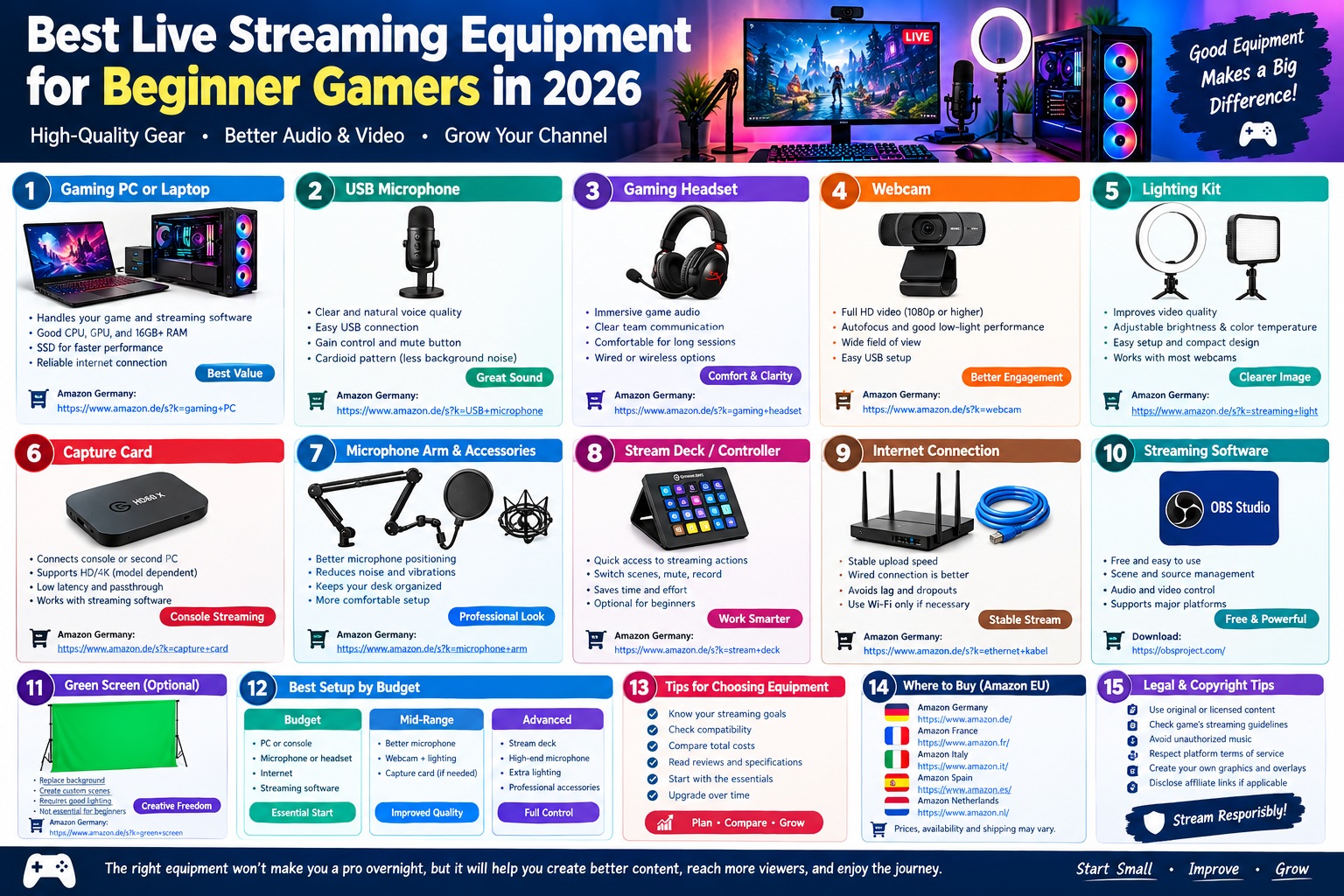
Best Live Streaming Equipment for Beginner Gamers in 2026: Complete Buying Guide
Starting Your Gaming Live Stream in 2026
Live streaming has become an exciting way for gamers to share gameplay, connect with viewers, and build an online community. Whether you want to stream competitive games, create entertaining gaming videos, or broadcast casual sessions with friends, choosing the right equipment can make your content easier to watch and listen to.
The good news is that you do not need an expensive studio to start streaming. A reliable gaming computer or console, a clear microphone, suitable headphones, and free streaming software can provide a solid foundation. A webcam, lighting kit, capture card, and stream controller can be added later when your needs grow.
The best live streaming equipment for beginner gamers should offer good performance, straightforward setup, reliable compatibility, and reasonable value for money. Instead of spending your entire budget on a professional camera or complicated audio system, it is usually better to prioritize clear sound, stable streaming performance, and good lighting.
This guide explores the essential streaming equipment for beginners in 2026, explains its main features and benefits, and provides Amazon Germany and European marketplace links to help you compare available products.
1. Gaming PC or Laptop: The Foundation of Your Streaming Setup
A gaming computer is one of the most important components of a PC-based streaming setup. It must run your game while handling broadcasting software, audio sources, alerts, and other applications.
A gaming desktop PC is often a good choice for beginners who play at home because it provides flexible upgrades, a range of cooling options, and the ability to replace individual components. A gaming laptop can be more practical for students and gamers who need portability.
For a new gaming and streaming PC, consider a modern processor with enough performance for your chosen games, at least 16GB of RAM as a starting point, and an SSD for quick loading times. A system with 32GB of RAM offers more flexibility for demanding games, multitasking, and content creation.
Your graphics card is also important. Many modern GPUs include hardware video encoders that can help stream gameplay without relying entirely on the CPU. The actual performance depends on your graphics card, streaming settings, game, and resolution.
If you already own a gaming computer, test its performance before buying new hardware. You may be able to begin streaming with your existing system and upgrade only if you experience dropped frames, unstable gameplay, or excessive system load.
Key features to look for:
- A processor suitable for your games and streaming applications.
- A dedicated GPU with supported hardware video encoding, where possible.
- At least 16GB of RAM, with 32GB offering greater flexibility.
- SSD storage for games, software, and recordings.
- Reliable internet connectivity.
- Sufficient USB ports for microphones, webcams, and other accessories.
Main benefits: A capable gaming PC allows you to play and broadcast simultaneously, customize your stream, add overlays, and expand your setup as your channel grows.
Amazon shopping links:
- Gaming PCs on Amazon Germany
- Gaming laptops on Amazon Germany
- Gaming PCs with 32GB RAM on Amazon Germany
2. USB Microphone: The Most Important Audio Upgrade
A good microphone is one of the most valuable investments for a beginner streamer. Viewers need to hear your commentary clearly, whether you are explaining a strategy, reacting to a match, or talking to your audience.
Although gaming headsets include built-in microphones, a dedicated USB microphone can provide more control over voice recording and microphone placement. USB models are particularly suitable for beginners because they connect directly to a computer without requiring a separate audio interface.
Look for a microphone with clear voice reproduction, convenient gain controls, and a directional pickup pattern suitable for one person speaking at a desk. A cardioid microphone primarily captures sound from the front, helping reduce some unwanted sound from the sides and rear. However, room acoustics, microphone distance, and background noise still affect the final result.
A physical mute button can be useful when you need to stop transmitting your voice quickly. Some models also include a headphone output for monitoring your microphone in real time.
Recommended Microphone Options for Beginners
FIFINE USB Microphones
FIFINE offers USB microphone models aimed at budget-conscious users. Depending on the model, features may include adjustable gain, a mute control, a desktop stand, and USB connectivity.
These microphones can be suitable for beginners who want to improve voice clarity without investing in a more complex audio system. Check the exact model’s connection type, included accessories, and compatibility before purchasing.
Amazon link: FIFINE USB microphones on Amazon Germany
HyperX QuadCast S
The HyperX QuadCast S is a USB condenser microphone with customizable RGB lighting and multiple pickup patterns. Its features can suit streamers who want an attractive desktop microphone with options for different recording situations.
Depending on the recording environment, a condenser microphone may capture more room noise than expected. Keeping it close to your mouth and reducing nearby noise can improve results.
Amazon link: HyperX QuadCast S on Amazon Germany
Elgato Wave:3
The Elgato Wave:3 is a USB microphone designed for streaming and voice recording. It includes software-based audio routing features that can help users manage microphone input and other audio sources.
It is worth considering if you want a dedicated microphone with a streaming-focused workflow. Beginners should compare its features and price with simpler USB alternatives before spending more.
Amazon link: Elgato Wave:3 on Amazon Germany
Main benefits of a dedicated USB microphone: Clearer commentary, convenient controls, simple installation, and more flexibility in positioning the microphone near your mouth.
3. Gaming Headset: Hear the Game and Communicate Clearly
A comfortable gaming headset allows you to hear game audio, communicate with teammates, and monitor your stream without playing sound through external speakers.
For streaming, closed-back headphones can help reduce game audio leaking into your microphone. This is particularly useful when recording commentary in a small room.
Choose a headset with comfortable ear cushions, an adjustable headband, suitable sound quality, and a microphone that works with your computer or console. If you prefer a separate streaming microphone, you can use a headset primarily for listening and communication.
Wired headsets are often a practical budget option because they do not require charging. Wireless models offer more freedom of movement but may cost more and require battery management.
Recommended Gaming Headset Options
HyperX Cloud III
The HyperX Cloud III is a wired gaming headset designed for comfort and gaming audio. Its features include a detachable microphone on supported versions, memory-foam ear cushions, and compatibility options that depend on the model and connection.
It can be a suitable option for gamers who want a straightforward headset for long gaming sessions. Check whether the version you choose supports your preferred computer or console connection.
Amazon link: HyperX Cloud III gaming headset on Amazon Germany
Logitech G435 LIGHTSPEED
The Logitech G435 is a lightweight wireless gaming headset. It offers wireless connectivity options on compatible devices, making it attractive to gamers who prefer a cable-free setup.
Before purchasing, verify compatibility with your specific gaming platform and whether you need Bluetooth or a dedicated wireless receiver.
Amazon link: Logitech G435 on Amazon Germany
SteelSeries Arctis Nova 1
The SteelSeries Arctis Nova 1 is a wired gaming headset designed for everyday gaming and communication. Its lightweight construction and adjustable fit can be useful for beginners who want a simple listening solution.
Compare the available versions and connection requirements to make sure the headset works with your equipment.
Amazon link: SteelSeries Arctis Nova 1 on Amazon Germany
Main benefits: A gaming headset provides immersive audio, clearer team communication, and convenient monitoring while helping keep game sound away from your microphone.
4. Webcam: Add a Face Camera to Your Stream
A webcam allows viewers to see your reactions and facial expressions while you play. It is particularly useful for conversational streams, community sessions, and gaming channels built around a creator’s personality.
However, a webcam is not essential for every beginner. If you prefer to stream gameplay only, you can start without a camera and invest in one later.
For most beginners, a 1080p webcam is a sensible starting point. Consider the frame rate, autofocus performance, field of view, mounting options, and image quality in low-light conditions.
A camera advertised as 1080p60 can capture up to 60 frames per second at its supported settings, while a 1080p30 model typically captures up to 30 frames per second. The actual output may depend on the camera, USB connection, software, and lighting.
Recommended Webcam Options
Logitech C920 HD Pro Webcam
The Logitech C920 is a widely recognized webcam option for video calls and basic content creation. It offers Full HD video at supported settings, autofocus, and a built-in stereo microphone.
Although its integrated microphone can be useful for calls, a dedicated microphone is generally preferable for gaming commentary. The C920 is worth considering if you want a straightforward camera for a beginner setup.
Amazon link: Logitech C920 webcam on Amazon Germany
Logitech StreamCam
The Logitech StreamCam is designed for video creation and supports Full HD recording at higher frame rates under compatible conditions. It is suitable for creators who want smoother camera movement and a dedicated webcam for regular streaming.
Check the USB connection requirements and your computer’s compatibility before buying.
Amazon link: Logitech StreamCam on Amazon Germany
Elgato Facecam MK.2
The Elgato Facecam MK.2 is a webcam aimed at content creators who want greater control over camera settings. Its features and supported output depend on the recording configuration and software.
It may be more appropriate for streamers who already have a good microphone and lighting setup and want to improve the camera image.
Amazon link: Elgato Facecam MK.2 on Amazon Germany
Main benefits: A webcam adds a personal touch, makes reactions visible, and can help create a more engaging experience for viewers who enjoy face-camera content.
5. Lighting Kit: Improve Your Video Without Buying an Expensive Camera
Lighting is one of the easiest ways to improve the appearance of a webcam. Even a capable camera can produce a noisy or dark image when the room is poorly lit.
A basic LED panel or ring light placed in front of you can make your face clearer and more evenly illuminated. You do not need a professional studio lighting system to get started.
Choose lighting with adjustable brightness so you can adapt it to your room. Adjustable color temperature is also useful because it allows you to select warmer or cooler light.
Position the light in front of you or slightly to one side, rather than placing a bright window directly behind your head. Avoid excessive brightness, reflections in glasses, and strong shadows.
Recommended Lighting Options
Neewer LED Video Light
Neewer offers a range of LED lighting products for video recording and streaming. Depending on the model, features may include brightness adjustment, color-temperature controls, a diffuser, or a mounting stand.
A compact LED panel can be a practical choice if you have limited desk space.
Amazon link: Neewer LED video lights on Amazon Germany
USB Ring Light
A USB ring light can provide simple front lighting for a webcam. Many models include adjustable brightness and a small stand or monitor mount.
This is a budget-friendly option for beginners who want to improve face-camera visibility without taking up much space.
Amazon link: USB ring lights for streaming on Amazon Germany
Elgato Key Light
The Elgato Key Light is designed for streamers and content creators who want a more adjustable lighting setup. Depending on the version, it offers brightness and color-temperature control and integration with compatible software or controls.
It is a premium option rather than a requirement for beginners. A simple LED light can be sufficient when starting out.
Amazon link: Elgato Key Light on Amazon Germany
Main benefits: Good lighting improves face visibility, helps a webcam produce a cleaner image, and makes your stream look more consistent without requiring an expensive camera.
6. Capture Card: Essential for Some Console Streaming Setups
A capture card transfers video and audio from a console or another computer into a streaming computer. It allows streaming software to receive the gameplay feed so you can combine it with a microphone, overlays, alerts, and other sources.
A capture card is not usually necessary if you stream gameplay directly from the same gaming PC that runs your streaming software. In that situation, the computer can often capture the game directly.
A capture card becomes useful when you want to stream from a PlayStation, Xbox, Nintendo console, or a second PC through a separate streaming computer.
Before purchasing, check the supported input resolution, capture resolution, frame rate, connection type, operating-system compatibility, and passthrough capabilities. Passthrough lets the gameplay signal continue to a monitor or television, helping you play without relying entirely on the preview inside streaming software.
Also check whether the device supports the features you need. For example, a card that accepts a 4K signal may not necessarily record or pass through every 4K format at the same frame rate.
Recommended Capture Card Options
Elgato HD60 X
The Elgato HD60 X is an external capture card designed for console and PC streaming workflows. It supports high-resolution passthrough and capture options that depend on the signal format and system configuration.
It is a useful option for beginners who want to connect a compatible console to a PC and use broadcasting software.
Amazon link: Elgato HD60 X on Amazon Germany
AVerMedia Live Gamer Ultra 2.1
The AVerMedia Live Gamer Ultra 2.1 is an external capture device designed for users who need support for modern high-resolution and high-refresh-rate gaming setups. Actual capture and passthrough capabilities depend on the selected video format and hardware configuration.
It may be more than a beginner needs, so compare its specifications with a simpler capture card before spending extra money.
Amazon link: AVerMedia Live Gamer Ultra 2.1 on Amazon Germany
Budget USB Capture Cards
Basic USB capture devices are available at lower prices, but their capabilities and reliability vary considerably. Check supported resolutions, frame rates, audio handling, latency, software compatibility, and seller information carefully.
Avoid assuming that every device advertised as “4K” can record 4K video at 60 frames per second. Read the full specifications before purchasing.
Amazon link: USB video capture cards on Amazon Germany
Main benefits: A suitable capture card lets you incorporate console gameplay into a PC-based stream, add customized overlays, and manage your broadcast through streaming software.
7. Microphone Arm, Pop Filter, and Shock Mount
A microphone’s sound quality depends not only on its specifications but also on how you position and use it.
A microphone arm allows you to place the microphone close to your mouth while keeping your desk clear. It can also make it easier to move the microphone away when you are not streaming.
A pop filter or foam windscreen can reduce harsh bursts of air caused by sounds such as “P” and “B.” A shock mount can help reduce some vibrations transmitted through the desk or microphone stand, depending on the design.
These accessories are not always necessary. Some USB microphones include a desktop stand or other mounting equipment, and many entry-level models can be used effectively without a separate arm.
Before buying an arm, check the microphone’s weight, mounting thread, clamp requirements, and desk thickness. Confirm that the accessory is compatible with your specific microphone.
Amazon shopping links:
- Microphone boom arms on Amazon Germany
- Microphone pop filters on Amazon Germany
- Microphone shock mounts on Amazon Germany
Main benefits: These accessories improve microphone positioning, reduce some unwanted handling noise, and make a streaming desk more comfortable to use.
8. Stream Deck or Shortcut Controller: Make Streaming Easier
A stream controller gives you physical buttons for common streaming actions. Depending on the device and software, you may be able to switch scenes, mute your microphone, start a recording, trigger an overlay, or adjust supported audio settings.
For beginners, this type of equipment is optional. Most streaming software supports keyboard shortcuts, so you can start streaming without purchasing a dedicated controller.
A hardware controller becomes more useful when you regularly switch between multiple scenes or manage several sources during a broadcast.
Recommended Stream Controller
Elgato Stream Deck Neo
The Elgato Stream Deck Neo is a compact control device intended for creators who want quick access to shortcuts and workflow actions. Its usefulness depends on the applications and integrations you plan to use.
It can simplify repeated actions during a stream, but it should generally come after essential equipment such as a microphone and suitable lighting.
Amazon link: Elgato Stream Deck Neo on Amazon Germany
Budget alternative: Use the keyboard shortcuts available in your streaming software until you know which actions you perform most often.
Main benefits: A stream controller can reduce the need to navigate menus during a broadcast and help you manage scenes, audio controls, and other supported actions more efficiently.
9. Internet Connection and Ethernet Cable
A stable internet connection is essential for live streaming. Even a high-quality microphone and webcam cannot compensate for frequent disconnections, severe buffering, or unstable upload speeds.
For PC streaming, a wired Ethernet connection is often a reliable choice because it avoids some of the interference and signal fluctuations that can affect Wi-Fi.
If you must use Wi-Fi, place your computer within a good signal range of your router and minimize interference from other devices where possible.
The upload speed you need depends on your streaming resolution, frame rate, video encoder, bitrate, and platform requirements. Check the current recommendations for the platform you use, and leave some bandwidth available for other household devices.
You should also test your connection at different times of day. A speed test can show your approximate upload speed, but a private or unlisted test stream may reveal problems that a single speed test does not.
Amazon shopping links:
- Ethernet cables on Amazon Germany
- USB Ethernet adapters on Amazon Germany
- Wi-Fi adapters for PCs on Amazon Germany
Main benefits: A stable connection helps reduce dropped frames, interrupted broadcasts, and inconsistent stream quality.
10. Streaming Software: Free Tools for Beginners
You do not need to buy expensive software to start broadcasting gameplay. Several streaming applications offer tools for capturing gameplay, managing audio, adding overlays, and broadcasting to supported platforms.
OBS Studio is a free, open-source application for video recording and live streaming. It allows users to create scenes, combine multiple video and audio sources, add text and images, and adjust streaming settings.
Its flexibility makes it a useful starting point for beginners who want to learn how a broadcast works. However, new users should spend time configuring the microphone, encoder, resolution, and bitrate before their first public stream.
You can download OBS Studio from its official website: OBS Studio.
For console users, the best workflow depends on the console’s built-in broadcasting options and whether a capture card and computer are involved.
Before adding complex overlays or animated effects, create a simple scene with gameplay and clear audio. Test your setup privately or record a short sample so you can check sound levels, image quality, and synchronization.
Main benefits: Streaming software provides the tools needed to broadcast gameplay, control scenes, combine audio and video, and customize the viewer experience without requiring a paid application.
11. Green Screen and Background Accessories
A green screen allows compatible software to remove a green background and replace it with a digital scene or transparent background effect. It can be useful for streamers who want to display gameplay more prominently or create a customized on-screen appearance.
However, a green screen is not essential for beginners. A tidy physical background can look just as effective, and it requires less setup.
If you choose a green screen, consider the available space, mounting method, fabric quality, and lighting. Uneven lighting or shadows on the fabric can make background removal less accurate.
You should also leave enough distance between yourself and the background where possible. This can help reduce unwanted shadows and green color reflecting onto your face or clothing.
Amazon shopping links:
- Green screens for streaming on Amazon Germany
- Portable green screen backgrounds on Amazon Germany
- Streaming desk accessories on Amazon Germany
Main benefits: A green screen offers greater control over your visual presentation and can help create a more customized stream layout.
12. Best Beginner Streaming Setups by Budget
You do not need to buy every component at once. A staged approach helps you spend money on the equipment that makes the biggest practical difference.
Budget Setup: Start With the Essentials
A basic setup can use an existing gaming PC or console, a USB microphone or suitable gaming headset, and free streaming software.
If you already own a headset with a clear microphone, test it before buying a separate microphone. You may find that your existing equipment is sufficient for your first streams.
For console streaming, use the console’s built-in broadcasting features if they meet your needs. This can avoid the cost of a capture card at the beginning.
Suggested priorities:
- Existing gaming PC or console.
- USB microphone or existing headset.
- Comfortable headphones.
- Stable internet connection.
- Free streaming software, where required.
This approach is ideal for learning how to manage a stream before making additional purchases.
Mid-Range Setup: Improve Audio and Video
Once you have streamed regularly, consider upgrading your microphone and adding a webcam with suitable lighting.
A dedicated USB microphone can improve voice control, while a 1080p webcam can add a face camera to your content. An LED light can help the webcam produce a cleaner image in a typical bedroom or home office.
If you stream from a console through a computer, a compatible capture card may also be worthwhile.
Suggested priorities:
- A dedicated USB microphone.
- A comfortable headset.
- A 1080p webcam, if needed.
- An adjustable LED light.
- A capture card for compatible console or second-PC workflows.
Advanced Setup: Build for Regular Streaming
A more advanced setup may include a premium microphone, additional lighting, a dedicated stream controller, and a capture card that supports your preferred resolution and refresh rate.
An audio interface and XLR microphone can provide more control, but they add complexity and cost. They are not necessary for most beginners.
Before upgrading, identify the limitations of your current equipment. For example, if viewers already hear you clearly, investing in better lighting or a more capable capture card may be more useful than replacing your microphone.
The best setup is the one that improves your actual workflow rather than simply adding more devices to your desk.
13. How to Choose the Right Streaming Equipment
Before purchasing streaming gear, consider the type of content you plan to create.
If you stream PC gameplay, start with a capable gaming computer, a microphone, headphones, and streaming software. You generally do not need a capture card when the game and streaming software run on the same computer.
If you stream console gameplay, first investigate the console’s built-in broadcasting features. If you want advanced overlays or PC-based scene control, check whether a capture card is required for your specific setup.
If your content includes face-camera commentary, prioritize a suitable webcam and lighting. If you mainly stream gameplay, you can postpone the camera purchase.
If you have a limited budget, improve your audio first. A clear microphone, sensible microphone placement, and controlled room noise can make a noticeable difference without a large investment.
Also check product compatibility before buying. USB ports, operating systems, console support, capture resolutions, microphone mounts, and wireless connections can vary between models.
Finally, compare the total cost rather than the advertised price of one component. You may need cables, a stand, a memory card, a USB hub, or a compatible adapter depending on your equipment.
14. Buying Streaming Equipment on Amazon Germany and the European Union
Amazon Germany is a useful place to compare streaming microphones, webcams, capture cards, headphones, lighting kits, and other accessories. Buyers elsewhere in the European Union can also explore their local Amazon marketplaces, where available.
Use the following links to compare products and specifications:
- Streaming microphones on Amazon Germany
- Gaming webcams on Amazon Germany
- Streaming lights on Amazon Germany
- Capture cards on Amazon Germany
- Gaming headsets on Amazon Germany
- Stream controllers on Amazon Germany
- Streaming microphones on Amazon France
- Streaming equipment on Amazon Italy
- Streaming equipment on Amazon Spain
- Streaming equipment on Amazon Netherlands
These links lead to marketplace search results rather than guaranteed listings for a specific model. Prices, stock, sellers, delivery destinations, and return conditions may change.
Before ordering, verify the exact model, included accessories, connection type, warranty information, seller details, and delivery availability for your country. Products sold through third-party marketplace sellers may have different terms from items sold directly by the marketplace.
15. Copyright, Licensing, and Legal Considerations for Gaming Streamers
Choosing streaming equipment is only one part of creating a channel. Your use of games, music, images, video clips, and other media can also affect whether your content complies with platform rules and copyright law.
Buying a microphone, webcam, or capture card does not automatically grant permission to use copyrighted material in a broadcast. Equipment and content rights are separate issues.
Use original overlays, graphics, and channel artwork that you created yourself or have permission to use. If you use stock images, fonts, sound effects, or music, check the relevant license and whether it permits commercial use, modification, and redistribution on streaming platforms.
Do not assume that music is safe to stream simply because it is available online or included in a game. Check the game’s streaming guidance and the license for any music you add separately.
Some games include settings that disable licensed music during broadcasts. When available, these features can help reduce the risk of including music that is not cleared for streaming.
Also review the terms of service and content policies of the streaming platform you choose. Requirements can differ between platforms and may change over time.
For a website that publishes streaming equipment guides, write original product descriptions and comparisons rather than copying manufacturers’ marketing text or another publisher’s reviews. Product names and factual specifications can generally be discussed, but logos, photographs, promotional images, and long passages of text may be protected by intellectual property rights.
Amazon product links should direct readers to the relevant marketplace pages without implying that your website is officially endorsed by Amazon. If you participate in an affiliate program, follow its disclosure rules and applicable advertising requirements. Disclose qualifying commercial relationships clearly and prominently, and verify the current program terms before publishing affiliate content.
These steps help you create a more responsible streaming setup and publish equipment guides with a lower risk of avoidable copyright or disclosure problems.
Conclusion: The Best Live Streaming Equipment for Beginner Gamers in 2026
The best live streaming equipment for beginner gamers in 2026 is not necessarily the most expensive setup. It is the equipment that provides clear audio, stable performance, convenient controls, and reliable compatibility with your computer or console.
Start with the essentials: a gaming PC or console, a suitable microphone or headset, a stable internet connection, and streaming software. Add a webcam and lighting if you want face-camera content, and purchase a capture card only when your chosen streaming workflow requires one.
For most beginners, a dedicated USB microphone is a sensible first upgrade, followed by lighting and a webcam when needed. A stream controller, green screen, and advanced audio equipment can wait until you understand your workflow and know which features will help.
Compare product specifications, verify compatibility, and check Amazon Germany and other European marketplaces for current availability and delivery conditions. Build your setup gradually, test each component before going live, and focus on producing clear, engaging content rather than buying every accessory at once.
With a practical budget and the right priorities, you can create a reliable gaming streaming setup in 2026 and upgrade it as your skills and audience grow.


