
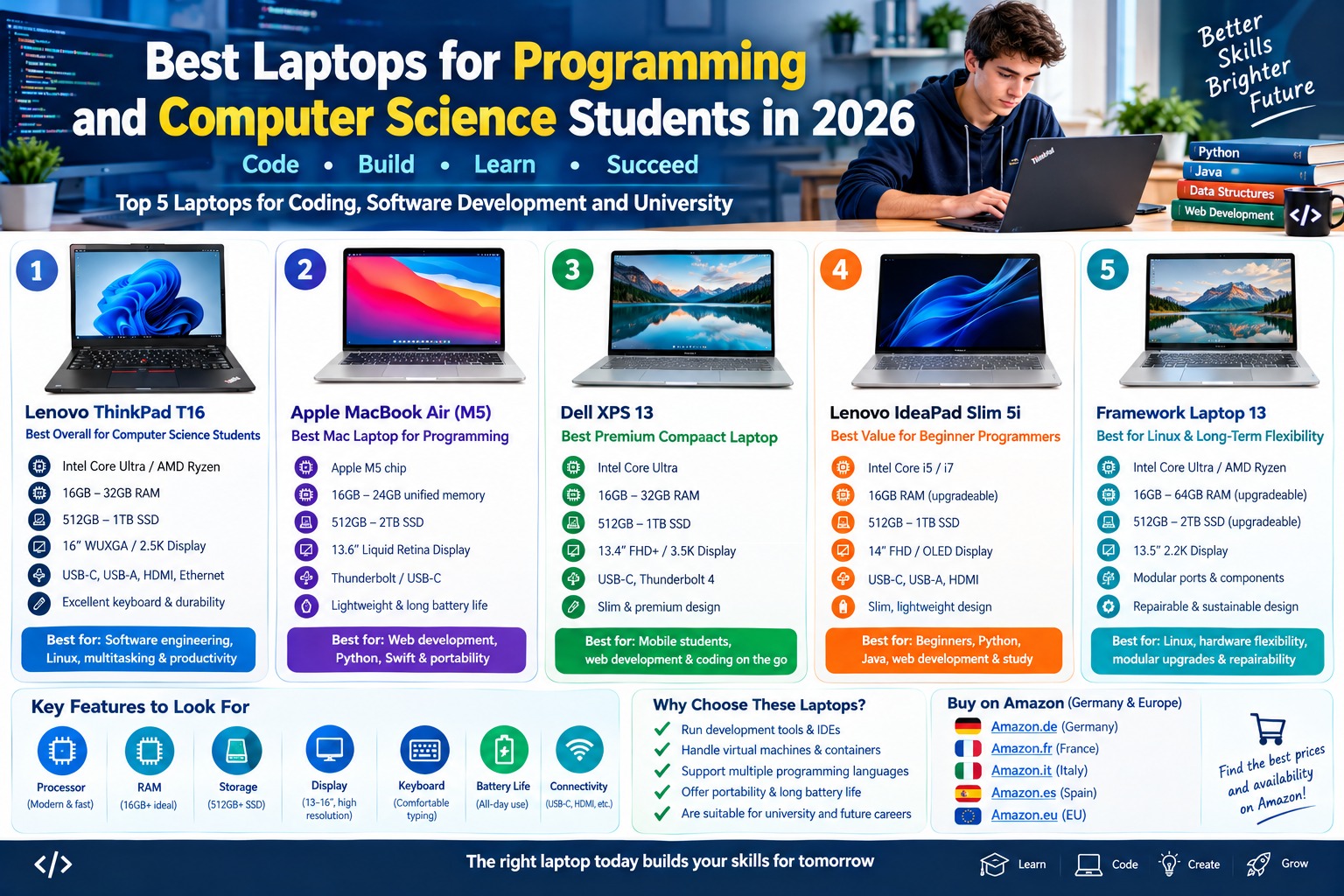
What Are the Best Laptops for Programming and Computer Science Students in 2026?
1. Lenovo ThinkPad T16: Best Overall Laptop for Computer Science Students
The Lenovo ThinkPad T16 is a strong choice for computer science students who prioritize productivity, a comfortable keyboard, and compatibility with common development tools. The ThinkPad family is widely used in professional environments, making it an appealing option for students who want a laptop suitable for university assignments, internships, and future software development work.
Its larger display is particularly useful for programming because students can view source code, documentation, terminal windows, and development tools without constantly switching between applications. Depending on the generation and configuration, the ThinkPad T16 is available with different processors, memory options, storage capacities, and display specifications.
Key Features of the Lenovo ThinkPad T16
The ThinkPad T16 family offers configurations designed for business productivity and demanding everyday workloads. Modern processor options depend on the specific generation and regional model. Students should look for a recent Intel Core Ultra or compatible AMD processor with sufficient performance for their intended development tasks.
A configuration with 16GB of RAM can handle many introductory programming assignments and everyday applications. However, 32GB is a better target for students who regularly use virtual machines, Docker, large development environments, or several demanding applications simultaneously.
The solid-state drive provides fast startup times and quick access to programming projects. A 512GB SSD is a useful starting point for source code, applications, documentation, and university files, while 1TB can be helpful for larger projects.
The ThinkPad’s keyboard is one of its main attractions. Comfortable typing is important when writing code for several hours, preparing assignments, or documenting software projects. Depending on the configuration, the laptop may also provide USB-A, USB-C, HDMI, and other useful connectivity options.
Main Advantages
The Lenovo ThinkPad T16 is well suited to students who spend much of their time coding, reading technical documentation, and working with multiple applications. Its larger screen offers more workspace than many compact laptops.
It is also worth considering for Linux-based development, although compatibility depends on the exact hardware configuration, Linux distribution, and drivers. Students planning to use Linux should check hardware support before buying.
Another advantage is its professional design. The ThinkPad range includes models intended for business environments, which can make it a practical choice for university work and future internships.
Potential Disadvantages
The larger screen can make the ThinkPad T16 less convenient to carry than a compact 13- or 14-inch laptop. Higher-performance configurations can also be expensive.
Memory upgradeability varies by generation and configuration, so students should verify whether the RAM is replaceable or soldered. Buyers should also compare the screen resolution, brightness, battery capacity, and exact processor before choosing a model.
Best for: Computer science students, software engineering, Linux development, full-stack programming, database projects, and students who prefer a larger screen.
Amazon Germany: Lenovo ThinkPad T16 on Amazon Germany
Amazon France: Lenovo ThinkPad T16 on Amazon France
Amazon Italy: Lenovo ThinkPad T16 on Amazon Italy
Amazon Spain: Lenovo ThinkPad T16 on Amazon Spain
Official product information: Lenovo ThinkPad laptops
2. Apple MacBook Air with M5: Best Mac Laptop for Programming Students
The Apple MacBook Air with M5 is an attractive option for students who want a lightweight laptop with strong everyday performance and a portable design. It is suitable for web development, Python programming, JavaScript projects, general software development, and many university assignments.
Apple’s macOS environment is popular among developers because it provides a Unix-based command-line environment, modern development tools, and access to a broad range of programming languages and applications. The MacBook Air is also particularly appealing to students who value portability and want to carry their laptop between lectures, libraries, and home.
Before purchasing, students should verify the exact chip generation, memory configuration, storage capacity, and software compatibility of the model available in their country.
Key Features of the Apple MacBook Air with M5
The MacBook Air with M5 combines Apple’s silicon architecture with macOS and an integrated graphics processor. Its performance is suitable for many everyday coding tasks, including editing source code, running development tools, browsing documentation, and building typical student projects.
The display provides a clear workspace for code, documents, and online learning materials. Screen size depends on the selected model, with different configurations offering different balances between portability and workspace.
Memory and storage should be selected carefully. For programming students, 16GB of unified memory is a sensible starting point, while 24GB or more may be preferable for heavier multitasking if offered by the configuration. A larger SSD can be useful for development environments, simulators, datasets, and local project files.
The MacBook Air’s fanless design on relevant models provides silent operation. Its portable construction and efficient hardware make it convenient for studying in classrooms, libraries, and shared workspaces.
Main Advantages
The MacBook Air is an excellent choice for students who need a lightweight computer for coding and university work. It is particularly suitable for web development, Python, Swift, JavaScript, and other programming workflows supported by macOS.
Its Unix-based environment makes terminal tools and many development workflows convenient to use. Students can also use applications such as Visual Studio Code, Git, and compatible database clients.
Another advantage is portability. Students who carry a laptop throughout the day may appreciate a device that is easy to transport and designed for everyday mobile use.
Potential Disadvantages
MacBooks can be expensive, especially when upgrading memory and storage. On many configurations, memory and internal storage cannot be upgraded after purchase, so students should choose carefully.
Some computer science courses require Windows-only software, specific Linux environments, or x86-based virtual machines. Apple silicon uses a different processor architecture, which means certain applications and virtual machines may require alternative versions or compatibility layers.
Students interested in game development, hardware-level programming, or courses that specify particular operating systems should check their university’s requirements before choosing a MacBook.
Best for: Web development, Python programming, Swift development, general software engineering, and students who prioritize portability.
Amazon Germany: Apple MacBook Air M5 on Amazon Germany
Amazon France: Apple MacBook Air M5 on Amazon France
Amazon Italy: Apple MacBook Air M5 on Amazon Italy
Amazon Spain: Apple MacBook Air M5 on Amazon Spain
Official product information: Apple MacBook Air
3. Dell XPS 13: Best Premium Compact Laptop for Coding on the Go
The Dell XPS 13 is a premium compact laptop designed for users who want a portable computer without sacrificing everyday performance. It is an appealing choice for students who travel frequently, attend lectures throughout the day, and need a capable machine for programming, research, and general productivity.
The 2026 XPS 13 range includes compact designs and modern processor options. Depending on the configuration, features can include a high-resolution display, integrated graphics, fast SSD storage, and memory configurations suitable for multitasking.
Its smaller screen makes it easier to carry than a 16-inch laptop, although students who frequently work with several code windows may prefer an external monitor or a larger notebook.
Key Features of the Dell XPS 13
The 2026 Dell XPS 13 offers a compact display, with configurations featuring a 13.4-inch-class screen. Depending on the model, buyers may find high-resolution touchscreen options and modern Intel processors.
For programming, the most important configuration choices are processor performance, RAM, and storage. A model with 16GB of RAM is suitable for many student workloads, while a configuration with 32GB provides additional room for demanding development tools and multitasking.
The SSD allows applications and projects to load quickly. Students can store programming assignments, documentation, local repositories, and development environments on the internal drive.
The XPS 13’s compact design is particularly useful for students who work in different locations. Port selection varies by generation, so buyers should check whether they need a USB-C hub for external displays, USB-A devices, or other accessories.
Main Advantages
The Dell XPS 13 offers a strong balance between portability and performance. It is suitable for programming assignments, web development, software testing, and everyday computer science coursework.
Its compact size makes it convenient to carry in a backpack, while the display options can provide a clear workspace for code and documentation. Modern configurations can also offer sufficient performance for more demanding multitasking when equipped with suitable memory.
For students who value a premium design and a portable Windows development machine, the XPS 13 is worth comparing with the MacBook Air and Lenovo ThinkPad ranges.
Potential Disadvantages
The smaller display may feel restrictive when working with multiple windows or large codebases. Students who regularly use several terminals, an IDE, and documentation simultaneously may benefit from an external monitor.
Premium configurations can be expensive, and the number of physical ports may be limited compared with larger laptops. Some models also have soldered memory, so buyers should confirm the RAM configuration before purchasing.
Best for: Students who travel frequently, web development, programming coursework, Windows-based development, and portable productivity.
Amazon Germany: Dell XPS 13 on Amazon Germany
Amazon France: Dell XPS 13 on Amazon France
Amazon Italy: Dell XPS 13 on Amazon Italy
Amazon Spain: Dell XPS 13 on Amazon Spain
Official product information: Dell XPS laptops
4. Lenovo IdeaPad Slim 5i: Best Value Laptop for Beginner Programmers
The Lenovo IdeaPad Slim 5i is a practical option for students who want a capable everyday laptop without paying for a premium business or workstation model. It is suitable for introductory programming courses, web development, Python, Java, C++, and common university productivity tasks.
For students who are beginning their computer science studies, choosing the right configuration can be more important than buying the most expensive laptop. A modern processor, 16GB of RAM, and a fast SSD can provide a solid foundation for learning programming and completing assignments.
The IdeaPad Slim 5i Gen 10 family includes different configurations, so students should compare the processor, display, memory, and storage available in their local market.
Key Features of the Lenovo IdeaPad Slim 5i
The IdeaPad Slim 5i Gen 10 includes configurations with modern Intel processors. Depending on the selected model, buyers may find Intel Core 5 or Core 7 options, integrated graphics, and memory configurations designed for multitasking.
Some configurations offer a 14-inch OLED display, while other versions may use different screen technologies. An OLED panel can provide strong contrast and vivid colors, but students should compare brightness, resolution, and battery performance before choosing a display.
The laptop’s slim design makes it suitable for carrying between lectures and study sessions. Depending on the configuration, the device may include USB-A, USB-C, HDMI, and other everyday connectivity options.
A 512GB SSD is a sensible starting point for many students, while 16GB of RAM is a useful target for programming coursework. Some configurations offer up to 32GB of memory, but upgradeability varies by model.
Main Advantages
The Lenovo IdeaPad Slim 5i is suitable for students who need one device for coding, assignments, research, browsing, and video calls. It can handle many common programming environments without requiring workstation-level hardware.
Its range of configurations makes it possible to compare different combinations of performance, display quality, memory, and storage. This is useful for students who need to balance their laptop requirements with a limited budget.
The slim design also makes it a convenient everyday study companion.
Potential Disadvantages
The IdeaPad Slim 5i is not designed to replace a dedicated workstation for every demanding workload. Integrated graphics may be insufficient for some advanced GPU-intensive applications, and entry-level configurations may struggle with very large development environments.
Features vary significantly between configurations. Students should check whether the RAM is upgradeable, which display is included, and how many ports are available on the exact model.
Best for: Beginner programmers, university students, Python and Java coursework, web development, and everyday study.
Amazon Germany: Lenovo IdeaPad Slim 5i on Amazon Germany
Amazon France: Lenovo IdeaPad Slim 5i on Amazon France
Amazon Italy: Lenovo IdeaPad Slim 5i on Amazon Italy
Amazon Spain: Lenovo IdeaPad Slim 5i on Amazon Spain
Official product information: Lenovo IdeaPad laptops
5. Framework Laptop 13: Best Laptop for Linux, Hardware Flexibility, and Long-Term Repairability
The Framework Laptop 13 is a distinctive option for computer science students who value repairability, customization, and control over their hardware. Rather than focusing only on a thin design, Framework emphasizes modular components and the ability to replace selected parts.
This approach can be attractive to students who want to understand computer hardware, use Linux, experiment with development environments, or keep their laptop in service for longer by replacing compatible components when necessary.
Exact processor options, memory compatibility, ports, and upgrade paths depend on the generation and configuration. Students should verify compatibility before purchasing individual parts or choosing a particular model.
Key Features of the Framework Laptop 13
The Framework Laptop 13 is a compact laptop designed around a modular architecture. Depending on the configuration, buyers can select modern processor options, memory capacity, SSD storage, and expansion-card ports.
The modular port system allows users to choose compatible expansion cards for their connectivity needs. This can be useful for computer science students who regularly connect external monitors, USB devices, or storage accessories.
Selected configurations support memory and storage upgrades, making it possible to adapt the laptop as requirements change. This is especially useful for students who begin with introductory programming and later move into more demanding software development or virtualized environments.
Framework laptops are also worth considering for Linux users. However, compatibility can vary by processor generation, wireless hardware, and Linux distribution, so students should check current support information for their chosen configuration.
Main Advantages
The Framework Laptop 13 stands out for its repairability and modular design. Students may be able to replace compatible components instead of replacing the entire laptop when a supported part fails or when an upgrade is needed.
Its configurable hardware is useful for programming students who want to choose the amount of memory and storage appropriate for their work. The laptop is also appealing to people interested in Linux, open development workflows, and learning more about computer hardware.
For students who value long-term flexibility, these features may be more important than having the thinnest possible laptop.
Potential Disadvantages
The Framework Laptop 13 may not be available through every Amazon European store, and configurations can be less straightforward to compare than mainstream laptops. Availability of replacement parts and expansion cards depends on the official supply channel and regional support.
Students should compare the total price of the laptop, memory, storage, operating system, and any additional components before deciding whether it offers better value than a conventional notebook.
It may also be less suitable for buyers who want a fully configured laptop from a local retailer without considering upgrades or component compatibility.
Best for: Linux development, programming enthusiasts, computer science students interested in hardware, modular upgrades, and repairability.
Amazon Germany: Framework Laptop 13 on Amazon Germany
Amazon France: Framework Laptop 13 on Amazon France
Amazon Italy: Framework Laptop 13 on Amazon Italy
Amazon Spain: Framework Laptop 13 on Amazon Spain
Official product information: Framework Laptop 13
Comparison Table: Best Laptops for Programming and Computer Science Students in 2026
The following table summarizes the main strengths of the five recommended laptop families.
| Laptop | Main Strength | Suitable Programming Tasks | Recommended Memory Target | Best For |
|---|---|---|---|---|
| Lenovo ThinkPad T16 | Comfortable keyboard and larger screen | Software engineering, databases, Linux, multitasking | 16GB minimum target; 32GB for demanding workloads | Overall productivity |
| Apple MacBook Air with M5 | Portable design and macOS development tools | Web development, Python, Swift, general coding | 16GB or more, depending on workload | Students who value portability |
| Dell XPS 13 | Compact premium design | Web development, programming coursework, everyday development | 16GB minimum target; 32GB for heavier multitasking | Mobile students |
| Lenovo IdeaPad Slim 5i | Balanced everyday performance | Beginner programming, Java, Python, web development | 16GB is a useful target | Value-conscious students |
| Framework Laptop 13 | Modular design and repairability | Linux, software development, customizable workflows | 16GB minimum target; 32GB for demanding tasks | Hardware flexibility |
These memory recommendations are general guidelines rather than fixed requirements. The right amount depends on the operating system, development tools, course requirements, and whether you use virtual machines or containers.
What Specifications Should a Programming Student Look for in 2026?
Processor: Intel, AMD, Apple Silicon, or Qualcomm
The processor affects how quickly a laptop can compile code, run development tools, and handle demanding multitasking. For introductory programming, a recent mid-range processor is usually sufficient.
Students working with large projects, complex builds, local development servers, or virtual machines may benefit from a more powerful processor. Compare the exact processor model rather than relying only on labels such as Core 5, Core 7, Ryzen, or Apple M-series.
Processor architecture also matters. Some applications and development environments are designed for x86 processors, while Apple silicon and certain Windows laptops use ARM-based processors. Check compatibility if your university requires specialized software or particular virtual-machine images.
RAM: Is 16GB Enough for Programming?
For many computer science students, 16GB of RAM is a practical starting point in 2026. It is generally suitable for a code editor, browser tabs, terminal windows, and common development tools.
However, 32GB can be a better choice for students who work with Docker, multiple virtual machines, Android Studio, large integrated development environments, or memory-intensive datasets.
Before buying, check whether the laptop’s memory can be upgraded. Some models use soldered RAM, which means the initial memory configuration may determine the laptop’s practical limits for its entire service life.
Storage: 512GB SSD or 1TB SSD?
A solid-state drive is important because it improves system responsiveness and application loading times. A 512GB SSD is a reasonable starting point for many students, while 1TB provides additional space for development environments, virtual machines, datasets, and project files.
Students who work with large datasets or several virtual machines should consider their storage requirements carefully. Cloud storage and external SSDs can help, but they do not replace the convenience of having enough internal storage for frequently used development tools.
Operating System: Windows, macOS, or Linux
Windows is a flexible option for students who need broad application compatibility, Windows-specific development tools, or courses based on Microsoft technologies. Windows Subsystem for Linux can also provide access to many Linux command-line tools.
macOS is useful for students who want a Unix-based environment and access to Apple’s development ecosystem. It is especially relevant for people interested in developing applications for Apple platforms, although hardware and software compatibility should be checked for each course.
Linux is widely used in software development, servers, cybersecurity education, and open-source projects. A laptop with good Linux hardware support can be useful for students who want to work directly in a Linux environment.
The best operating system is the one that supports your university’s software requirements and the development tools you plan to use.
Display Size and Resolution
A 14-inch laptop offers a useful balance between screen space and portability. A 13-inch model is easier to carry, while a 16-inch display can make it easier to view code, documentation, and terminal windows side by side.
Display resolution, brightness, reflections, and aspect ratio also affect comfort during long study sessions. OLED displays offer strong contrast, but a good IPS display may be sufficient for programming and can be a practical value-oriented option.
Students who work at a desk for extended periods may benefit from connecting an external monitor.
Keyboard and Trackpad
A comfortable keyboard is one of the most important features of a programming laptop. Coding often involves long periods of typing, so key layout, feedback, and spacing can affect the overall experience.
A responsive trackpad is useful when working without a mouse, particularly in classrooms and libraries. Students should also consider keyboard layout when purchasing from another European country, since German, French, Italian, and Spanish layouts can differ.
Battery Life and Portability
Students frequently carry their laptops between lectures, libraries, and home. A lightweight design and dependable battery can make a significant difference during a full day of classes.
Actual battery life depends on display brightness, processor workload, applications, wireless connectivity, and power settings. Students who compile large projects or run virtual machines may experience shorter battery life than users performing light tasks.
Compare independent battery tests where possible and consider the weight of the charger as well as the laptop itself.
Do Computer Science Students Need a Dedicated Graphics Card?
Most students learning Python, Java, C++, HTML, CSS, JavaScript, databases, and general software engineering do not need a dedicated graphics card. Integrated graphics are usually sufficient for coding, web development, and many everyday programming assignments.
However, a dedicated GPU can be useful for machine learning, deep learning, 3D graphics, game development, and other GPU-intensive applications. The exact requirements depend on the software used by the course or project.
Students planning to study artificial intelligence should distinguish between learning to write machine learning code and training large models locally. Many introductory exercises can run on ordinary hardware or cloud-based platforms, while demanding local workloads may require significantly more graphics memory and processing power.
Before paying extra for a gaming laptop or workstation, check whether your university provides access to cloud computing, remote servers, or dedicated laboratory machines.
Best Laptop for Different Programming Specializations
Best Laptop for Web Development
Web development generally does not require workstation-level hardware. A laptop with a modern processor, 16GB of RAM, and a 512GB SSD is suitable for many projects involving HTML, CSS, JavaScript, React, Node.js, databases, and browser-based development tools.
The Lenovo IdeaPad Slim 5i is a practical choice for students who want value, while the MacBook Air is appealing to those who prefer macOS and a portable design.
Best Laptop for Software Engineering
Software engineering students often need to compile projects, run automated tests, work with Git, use integrated development environments, and operate local services.
The Lenovo ThinkPad T16 is a strong option because of its larger screen and productivity-focused design. Students who frequently run virtual machines or containers should consider 32GB of RAM where their budget allows.
Best Laptop for Python and Data Science
Python programming can run comfortably on many modern laptops. Data science workloads, however, vary widely depending on the size of datasets, the libraries being used, and whether computation is performed locally or remotely.
The MacBook Air and Lenovo ThinkPad T16 are both worth considering for general Python development. Students who plan to run large datasets, multiple environments, or demanding local workloads should prioritize memory and storage capacity.
Best Laptop for Artificial Intelligence and Machine Learning
Artificial intelligence coursework can range from basic Python exercises to GPU-intensive model training. For introductory machine learning, a conventional laptop with sufficient RAM may be adequate.
Students who need to train large models locally should investigate GPU memory, framework compatibility, cooling, and power requirements. A laptop with a dedicated NVIDIA GPU may be more suitable for certain CUDA-based workflows, but cloud-based GPU services can also be an option when permitted by the course.
Best Laptop for Linux Development
The Lenovo ThinkPad T16 and Framework Laptop 13 are worth considering for Linux-focused workflows. Their suitability depends on the exact hardware generation, wireless components, firmware, and Linux distribution.
Before purchasing, check current Linux compatibility reports for the specific configuration. This can help avoid problems with wireless networking, sleep behavior, graphics, or other hardware features.
Best Laptop for Game Development
Game development requirements depend on the engine and project. Small 2D games and introductory projects can run on many conventional laptops, while complex 3D projects may benefit from a dedicated GPU, additional memory, and stronger cooling.
Students using demanding versions of Unity, Unreal Engine, or professional 3D software should review the official system requirements before selecting a laptop.
Best Accessories for Programming and Computer Science Students
External Monitor
An external monitor can improve productivity by allowing students to keep code, documentation, terminals, and reference material visible at the same time. A monitor with a comfortable resolution and adjustable stand can be particularly useful for long study sessions.
Amazon Germany: External monitors for programming
Amazon France: External monitors for programming
Amazon Italy: External monitors for programming
Amazon Spain: External monitors for programming
External SSD
An external SSD can provide additional storage for backups, large projects, virtual-machine files, and datasets. Students should choose a drive compatible with their laptop’s ports and storage needs.
Amazon Germany: External SSDs
Amazon France: External SSDs
Amazon Italy: External SSDs
Amazon Spain: External SSDs
USB-C Hub
A USB-C hub can add connectivity for external monitors, USB accessories, and storage devices. This is useful for compact laptops that have a limited number of built-in ports.
Before purchasing, check the laptop’s supported USB-C features and the hub’s compatibility with external displays and charging.
Amazon Germany: USB-C hubs
Amazon France: USB-C hubs
Amazon Italy: USB-C hubs
Amazon Spain: USB-C hubs
How to Choose the Best Programming Laptop on Amazon Germany and Europe
When shopping for a programming laptop, compare the complete configuration rather than relying on the product name alone. Two laptops from the same series can have different processors, screens, memory capacities, and storage options.
First, confirm the exact processor model and make sure it supports the software required by your degree program. Next, compare RAM and SSD capacity, paying particular attention to whether memory can be upgraded later.
Check the keyboard layout, operating system, warranty conditions, seller information, and return policy. If you are purchasing from a different European Amazon marketplace, verify the delivery options and whether the product configuration matches your requirements.
Amazon Germany, France, Italy, and Spain may list different configurations and prices. The links in this guide lead to product search pages rather than guaranteed individual listings, so availability and prices can change.
Students should also compare the cost of accessories such as a USB-C hub, external monitor, and backup drive. A balanced laptop configuration is often more useful than spending the entire budget on a premium processor while compromising on memory or storage.
Conclusion: What Is the Best Laptop for Programming and Computer Science Students in 2026?
The best laptop for programming and computer science students in 2026 depends on the student’s budget, operating system requirements, and development specialization. The Lenovo ThinkPad T16 is a strong all-round choice for students who value a comfortable keyboard, a larger screen, and a productivity-focused design.
The Apple MacBook Air with M5 is an appealing option for students who want a portable laptop for macOS development, web programming, and everyday university work. The Dell XPS 13 is suitable for students who prioritize a compact premium Windows laptop, while the Lenovo IdeaPad Slim 5i offers a practical balance for beginner programmers and budget-conscious buyers.
The Framework Laptop 13 stands out for students who value modular hardware, repairability, and customization, particularly for Linux-based development.
For most computer science students, a recent processor, 16GB of RAM, and a 512GB SSD provide a sensible starting point. Students who expect to run virtual machines, Docker containers, demanding IDEs, or data-intensive applications should consider 32GB of RAM and additional storage where their budget allows.
Before buying, confirm your university’s software requirements, check the exact laptop configuration, and compare current listings on Amazon Germany and other European Amazon stores. Choosing a laptop that matches your actual coursework can help you study more effectively, develop practical programming skills, and prepare for a future career in software engineering.


