
Comparing the Best AI Assistants for Students in 2026
1. ChatGPT: Best Overall AI Assistant for Students
ChatGPT is a general-purpose AI assistant developed by OpenAI. It can help students explore academic subjects, understand challenging concepts, brainstorm project ideas, organize research, and improve their writing. Its conversational interface makes it easy to ask follow-up questions and request explanations at different levels of difficulty.
Key Features of ChatGPT
ChatGPT supports a wide range of educational activities, including answering questions, explaining concepts, summarizing text, generating practice exercises, brainstorming essay topics, and helping students understand programming.
Depending on the available plan and current usage limits, students may also be able to upload documents, analyze images, work with data, use voice features, and access additional research capabilities.
One particularly useful feature is interactive learning. Instead of asking only for a final answer, students can request a step-by-step explanation, ask for a simpler example, and then test their understanding with a new practice question.
For example, a student studying physics can ask ChatGPT to explain Newton’s laws, provide everyday examples, and create practice questions to help reinforce the lesson.
Main Advantages of ChatGPT
Versatility: ChatGPT can assist with many subjects and different types of academic work, making it a useful starting point for students who want one general-purpose tool.
Interactive explanations: Students can ask follow-up questions until they understand a concept more clearly.
Writing assistance: It can help organize essay ideas, improve sentence structure, suggest outlines, and provide feedback on drafts.
Study planning: Students can use it to create revision schedules, generate practice questions, and divide large assignments into manageable tasks.
Coding support: It can explain programming concepts, help interpret error messages, and demonstrate coding techniques.
Free access: A free version is available, although usage limits and access to advanced tools may vary.
Potential Disadvantages of ChatGPT
ChatGPT can produce inaccurate facts, incorrect calculations, or explanations that overlook important details. Its answers should not automatically be treated as authoritative academic sources.
Students should verify important claims using textbooks, scientific publications, official websites, and other reliable references. They should also check generated citations rather than assuming that every reference is genuine.
Some advanced capabilities have usage limits or require a paid subscription. The exact features available can change over time.
Who Should Use ChatGPT?
ChatGPT is particularly suitable for students who need a flexible AI assistant for several subjects. It can be useful for understanding lessons, practicing questions, organizing projects, improving writing, and learning programming.
Best for: General homework support, interactive explanations, study planning, writing feedback, and coding assistance.
Official website: ChatGPT
Official pricing: ChatGPT Plans
2. Google Gemini: Best for Students Using Google Services
Google Gemini is Google’s AI assistant. It can help students answer questions, explore research topics, summarize information, develop ideas, and prepare academic projects.
Gemini may be particularly convenient for students who already use Google services such as Google Docs, Google Drive, and Gmail. Available integrations depend on the account, region, product, and subscription.
Key Features of Google Gemini
Gemini can explain academic concepts, summarize text, brainstorm essay topics, generate practice questions, and help structure presentations.
Depending on the version and account access, it may support uploaded files, image-related tasks, and other capabilities that help students work with different types of information.
Its connection with compatible Google services can also support productivity. Students may find it useful when their notes, documents, and other coursework are already organized through Google’s ecosystem.
For example, a student preparing a presentation about renewable energy could use Gemini to explore the topic, identify important questions, and develop an outline before checking the facts against reliable sources.
Main Advantages of Google Gemini
Google ecosystem: Gemini can be convenient for students who already use compatible Google services for their coursework.
Research assistance: It can help students explore unfamiliar topics, develop search questions, and identify areas that need further investigation.
Multiple types of input: Depending on available features, students may be able to work with text, images, and supported documents.
Brainstorming: Gemini can suggest project ideas, presentation structures, and alternative approaches to an assignment.
Study support: Students can request explanations, summaries, and practice questions to reinforce their understanding.
Free access: A free version is available, although advanced models and features may have restrictions.
Potential Disadvantages of Google Gemini
Gemini can make factual mistakes, misunderstand instructions, or produce incomplete explanations. Students should verify important claims before including them in academic work.
Its integration with Google services is not necessarily identical for every user. Some features may require a particular account type or paid subscription.
Students should also distinguish between an AI-generated summary and an original academic source. For research assignments, it is important to read and evaluate the source material directly.
Who Should Use Google Gemini?
Gemini is a good option for students who use Google services regularly and want an assistant for research, brainstorming, summarization, and everyday academic productivity.
Best for: Research exploration, Google-based workflows, brainstorming, summaries, and general study assistance.
Official website: Google Gemini
Official plans and features: Google One AI Plans
3. Claude: Best for Long Documents and Structured Writing
Claude is an AI assistant developed by Anthropic. It can help students understand complex reading materials, analyze documents, organize ideas, improve writing, and explore technical subjects.
Claude is worth considering when academic work involves lengthy passages, several documents, or a need to structure complicated information into a clear explanation.
Key Features of Claude
Depending on the current plan and available features, Claude can summarize documents, explain difficult concepts, assist with writing, analyze supported files, and help students understand programming and technical material.
Students can ask Claude to identify the central argument of a reading, compare ideas across documents, explain unfamiliar terminology, or suggest improvements to an essay’s structure.
It can also help transform unorganized notes into a clearer outline that students can review and adapt for their own study purposes.
For example, a student studying history could ask Claude to summarize a long reading, identify its main arguments, and create a list of questions to answer while revising.
Main Advantages of Claude
Document analysis: Claude can be useful when students need help understanding lengthy texts and organizing information.
Structured writing: It can suggest outlines and ways to improve the clarity and logical flow of essays.
Detailed explanations: Students can ask for complex ideas to be explained in simpler language or divided into smaller sections.
Reading comprehension: It can help identify main arguments, themes, and questions that deserve further investigation.
Programming support: Claude can explain code, assist with debugging, and help students understand technical concepts.
Free access: A free plan is available, subject to current usage limits and feature availability.
Potential Disadvantages of Claude
Claude can misinterpret documents, overlook details, or produce conclusions that are not fully supported by the source material.
Students should compare summaries with the original documents, especially when working with academic research or preparing assignments that require accurate quotations and references.
Free-plan limits may also affect students who need to process many documents or use the service frequently. Some advanced capabilities may require a paid subscription.
Who Should Use Claude?
Claude is particularly suitable for students who regularly read lengthy documents, prepare structured essays, analyze complicated arguments, or need help understanding technical material.
Best for: Long-document summaries, essay planning, reading comprehension, structured explanations, and coding support.
Official website: Claude
Official plans: Claude Plans
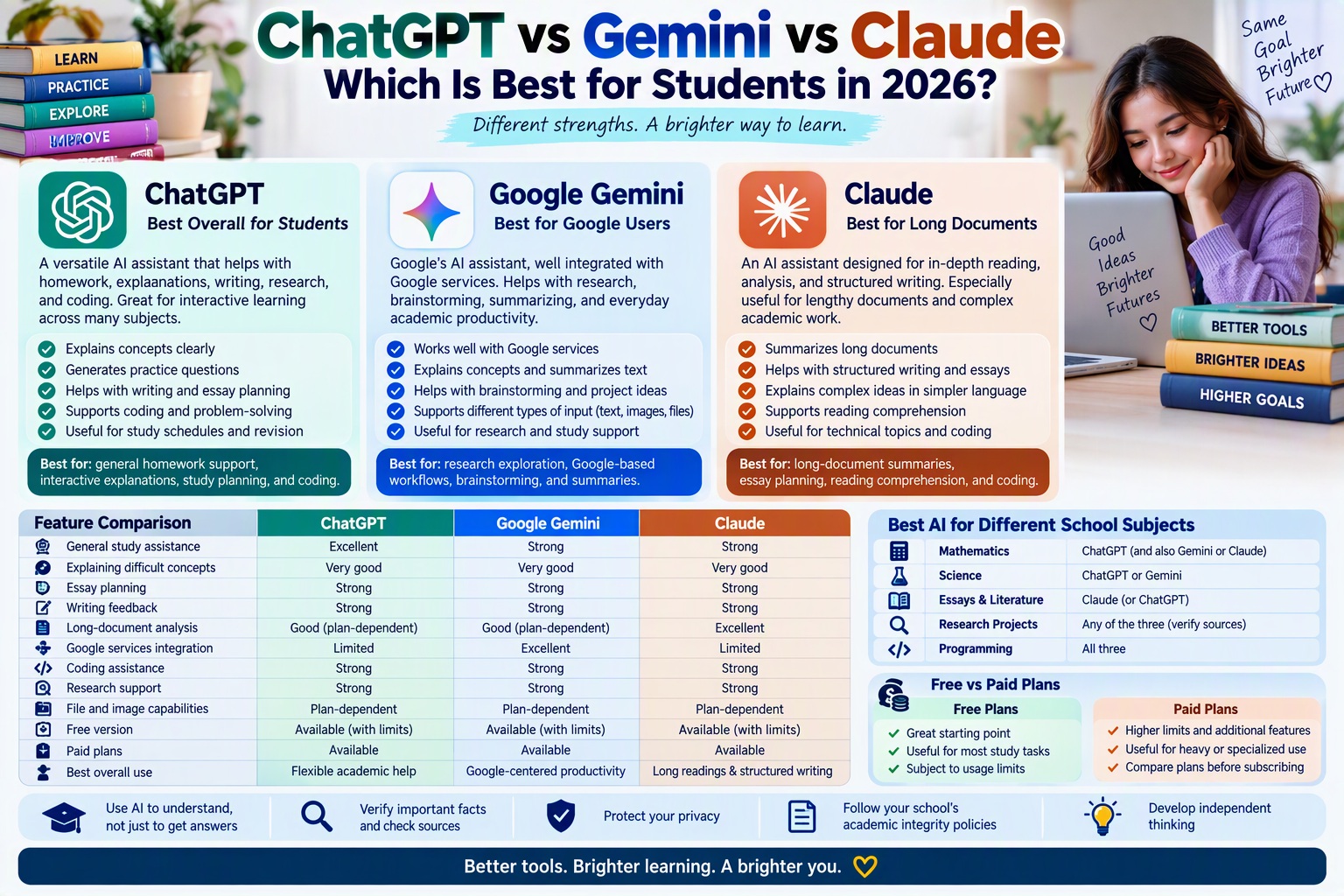
ChatGPT vs Gemini vs Claude: Feature Comparison
The following table summarizes the main differences between these three AI assistants for students in 2026. Exact capabilities depend on the current version, account, and subscription.
| Feature | ChatGPT | Google Gemini | Claude |
|---|---|---|---|
| General study assistance | Excellent all-purpose option | Strong all-purpose option | Strong all-purpose option |
| Explaining difficult concepts | Useful for interactive learning | Useful for alternative explanations | Useful for detailed explanations |
| Essay planning | Strong | Strong | Strong |
| Writing feedback | Useful for structure and clarity | Useful for drafting and revision | Useful for structured writing |
| Long-document analysis | Depends on plan and file limits | Depends on plan and file limits | A key use case, subject to limits |
| Google services integration | Depends on available connectors and features | Particularly convenient for compatible Google services | Depends on available integrations |
| Coding assistance | Available | Available | Available |
| Research support | Can support research workflows | Can support research workflows | Can analyze and organize research material |
| File and image capabilities | Plan-dependent | Plan-dependent | Plan-dependent |
| Free version | Available with limits | Available with limits | Available with limits |
| Paid plans | Available | Available | Available |
| Best overall use | Flexible academic assistance | Google-centered productivity | Long readings and structured writing |
No single assistant is best at every task. Results depend on the quality of the question, the material supplied, the available model, and how carefully the student verifies the answer.
Which AI Is Best for Different School Subjects?
The best AI assistant may vary depending on the subject and the type of work required.
Best AI for Mathematics
ChatGPT, Gemini, and Claude can all help students understand mathematical concepts, review formulas, and practice problem-solving.
A useful approach is to ask for an explanation of the relevant principle, study a similar worked example, and then solve a new problem independently.
Students should check calculations carefully and avoid assuming that a confidently presented solution is necessarily correct.
Recommended starting point: ChatGPT for interactive practice, while comparing explanations from Gemini or Claude when a concept remains unclear.
Best AI for Science
Science students can use all three assistants to explore concepts in biology, chemistry, physics, and other disciplines.
They can ask for simpler explanations, compare related concepts, generate revision questions, and organize notes. For technical calculations or scientific claims, students should verify the results using textbooks, course materials, and trusted scientific sources.
Recommended starting point: ChatGPT or Gemini for general explanations, with Claude as another option for analyzing detailed reading material.
Best AI for Essays and Literature
All three assistants can help students brainstorm essay topics, develop outlines, understand difficult passages, and review the clarity of their writing.
Claude is worth considering for analyzing long passages and organizing complex arguments. ChatGPT is useful for interactive brainstorming and feedback, while Gemini can support students who work within compatible Google services.
The final argument and submitted work should reflect the student’s own understanding and follow the institution’s rules on AI assistance.
Recommended starting point: Claude for structured reading and writing support, or ChatGPT for interactive essay planning.
Best AI for Research Projects
Research requires more than a clear summary. Students need reliable sources, careful evaluation, and accurate references.
ChatGPT, Gemini, and Claude can help refine research questions, explain unfamiliar terms, and organize information. However, students should consult original sources and verify the evidence behind important claims.
An AI-generated bibliography should never be accepted without checking that every source exists and supports the relevant statement.
Recommended starting point: Use any of the three to develop research questions, then consult academic databases, university publications, official reports, and primary sources.
Best AI for Programming
Students learning programming can use ChatGPT, Gemini, and Claude to understand code, interpret error messages, and practice problem-solving.
Ask the assistant to explain what each part of a code example does, identify the underlying concept, and suggest a similar exercise. Students should test code and learn why a solution works instead of copying it without understanding.
Recommended starting point: Compare the explanations each assistant provides and test any code in the appropriate learning environment.
Which AI Assistant Is Best for University Students?
University students often need help with academic reading, research planning, essays, presentations, and independent study.
ChatGPT can serve as a flexible study assistant for multiple subjects. It can help break down complicated assignments, explain technical concepts, and generate practice questions.
Gemini is particularly convenient for students who organize their coursework using compatible Google services. It can support brainstorming, summaries, and everyday productivity tasks.
Claude is worth considering for students who regularly work with long readings, complex written arguments, or documents that need careful organization.
For most university students, the most practical choice is the assistant that fits their everyday workflow and the requirements of their course. Testing the free versions can help identify which one provides the clearest explanations and most useful feedback.
Which AI Is Best for High School Students?
High school students may benefit most from an AI assistant that explains lessons clearly and encourages independent practice.
ChatGPT can provide interactive explanations and practice questions. Gemini can help students explore topics and organize ideas, while Claude can help clarify reading passages and structure written work.
Students should use these assistants to reinforce classroom learning rather than replace textbooks, teachers, or independent thinking.
It is also important to follow school policies on AI-assisted assignments and avoid submitting generated content as original work when this is not permitted.
Free vs Paid Plans: Which Option Is Best for Students in 2026?
ChatGPT, Gemini, and Claude offer free access, but usage limits, models, tools, and features vary. Paid plans may provide additional capabilities or higher limits, depending on the service.
Free AI Plans
Free plans are a sensible starting point for students who need occasional help with explanations, brainstorming, revision, and writing feedback.
Before subscribing to a paid plan, students should test how well the free version handles their actual coursework. They should also check whether its usage limits are sufficient for their normal study routine.
Paid AI Plans
Paid plans may be useful for students who regularly analyze documents, need more frequent access, or rely on specific advanced tools.
However, a subscription does not guarantee more accurate answers or better academic results. Students should compare the current features, usage limits, regional availability, and monthly costs before deciding.
How to Choose Without Overspending
Start with one free assistant and use it for several real study tasks. Evaluate the quality of its explanations, how well it follows instructions, and how often you need to correct its answers.
If you encounter a specific limitation, compare the available plans and alternatives before paying. You may find that a free version already meets your needs.
For current details, visit the official plan pages for ChatGPT, Gemini and Google AI plans, and Claude.
Can Students Buy ChatGPT, Gemini, and Claude on Amazon Germany or Amazon Europe?
Students looking for subscriptions to ChatGPT, Gemini, or Claude should distinguish between AI services and physical products sold through online retailers.
These three tools are primarily accessed through their official websites and applications. Subscription availability, payment methods, prices, and included features can vary by service and region. The safest way to check a subscription is to use the provider’s official pricing page rather than assume that an Amazon listing offers an official subscription.
Amazon Germany and other European Amazon stores may list books about using AI tools, study guides, and educational resources. These are different from official subscriptions to the AI services themselves.
The following Amazon search links can help students find relevant books and learning materials. They are search pages, not guarantees that a particular book or official subscription is available.
Amazon Germany:
- Search ChatGPT study guides on Amazon Germany
- Search Google Gemini guides on Amazon Germany
- Search Claude AI guides on Amazon Germany
Amazon France:
- Search ChatGPT study guides on Amazon France
- Search Google Gemini guides on Amazon France
- Search Claude AI guides on Amazon France
Before buying a book, check its publication date, edition, language, reviews, and whether it covers the current versions of the tools. AI features can change quickly, so older guides may not describe the latest interfaces or subscription options.
How to Use AI Responsibly for Academic Success
AI assistants can make studying more convenient, but their value depends on how students use them.
Use AI to Understand, Not Just to Get Answers
Instead of asking for a final answer only, request an explanation of the concept, a similar example, or a practice question. Try solving the next problem independently to check your understanding.
Verify Important Facts
AI assistants can make mistakes. Confirm important facts, calculations, quotations, and references using reliable sources, including textbooks, academic publications, and official educational websites.
Protect Your Privacy
Avoid sharing passwords, sensitive personal information, or confidential documents. Before uploading school materials or research files, check the service’s privacy settings and your institution’s rules.
Follow Academic Integrity Policies
Schools and universities have different rules about AI assistance. Some allow brainstorming or proofreading but restrict generated text in submitted assignments. Follow the relevant policy and disclose AI assistance when required.
Develop Independent Thinking
Use AI as a learning partner. Ask it to explain a topic, then summarize the lesson in your own words. Compare different explanations and identify questions that still need investigation.
This approach can help students develop stronger reasoning and study skills instead of becoming dependent on automatically generated answers.
Final Verdict: Is ChatGPT, Gemini, or Claude Best for Students in 2026?
ChatGPT, Google Gemini, and Claude are all useful AI assistants for students in 2026, but their strengths suit different academic needs.
ChatGPT is the best starting point for students who want a flexible, all-purpose assistant for explanations, practice questions, study planning, writing feedback, and coding support.
Google Gemini is an excellent option for students who use compatible Google services and want AI assistance for research exploration, brainstorming, summaries, and everyday productivity.
Claude is particularly worth considering for students who work with lengthy documents, detailed readings, structured essays, and complex written arguments.
For most students, the best choice is not necessarily the most expensive plan or the assistant with the longest list of features. It is the tool that explains concepts clearly, fits the student’s workflow, and helps build genuine understanding.
Start with the free versions, compare them using real study tasks, verify important information, and follow your school’s academic integrity policies. Used responsibly, ChatGPT, Gemini, and Claude can all help students study more effectively and become more independent learners.


