
Why Students Need AI Note-Taking Apps in 2026
1. Google NotebookLM: Best AI Note-Taking Tool for Studying Course Materials
Google NotebookLM is an AI-powered research and study assistant that helps students understand information from their own documents and reference materials. It is particularly useful for students who work with lecture notes, PDFs, research papers, textbooks, and other educational resources.
Unlike traditional note-taking applications, NotebookLM focuses on helping users explore and understand the information they provide. Students can add supported sources, ask questions about their contents, and create organized summaries for revision.
Key Features of Google NotebookLM
NotebookLM can summarize uploaded materials, answer questions about selected sources, identify important concepts, and help students organize information from multiple documents. Depending on current availability, it can also generate study guides, frequently asked questions, and audio overviews.
For example, a university student preparing for a biology examination can upload lecture notes and compatible reading materials, then ask the application to summarize the main concepts and identify topics that require further revision.
Its source-based approach is particularly useful when students want to understand specific course materials rather than receive a general answer about a subject.
Main Advantages
One of NotebookLM’s strongest advantages is its ability to work with a student’s own study materials. This makes it easier to review lengthy documents and locate information relevant to a particular lesson.
The application can also help students turn complicated readings into manageable summaries. Its references to supplied sources make it easier to check where information comes from and return to the original material.
NotebookLM is a strong starting point for students who want AI-powered study assistance without immediately paying for a premium note-taking subscription. Available features and usage limits may vary.
Potential Disadvantages
NotebookLM depends on the quality of the materials provided. If a document is incomplete or contains errors, the resulting summaries may also be incomplete or misleading.
Students should check important claims against the original sources and their teachers’ instructions. The application is primarily designed to work with existing materials, so it should not be confused with a dedicated tool for automatically recording every live classroom lecture.
Best for: PDF summaries, lecture notes, research documents, study guides, and exam preparation.
Official website: Google NotebookLM
2. Notion AI: Best AI Note-Taking App for Organizing Student Life
Notion is a flexible digital workspace that allows students to organize notes, assignments, projects, reading lists, and study schedules in one place. Its AI capabilities can help students summarize information, improve written notes, brainstorm ideas, and manage academic tasks.
For students who struggle to keep track of multiple subjects and deadlines, Notion provides a structured environment for organizing an entire semester.
Key Features of Notion AI
Notion combines pages, databases, templates, task lists, and collaborative workspaces. Its AI features can assist with summarizing notes, rewriting text, generating ideas, and extracting useful information from supported content.
Students can create separate pages for each subject, maintain lists of upcoming assignments, organize research materials, and build revision databases.
For example, a student taking mathematics, history, and biology can create a separate workspace for each subject, organize notes by topic, and use available AI features to help summarize material or plan revision sessions.
Main Advantages
Notion’s biggest advantage is its flexibility. Students can customize their workspace to match their preferred study method rather than following a rigid note-taking format.
It is also useful for managing group projects, organizing assignment deadlines, and maintaining a central collection of study materials.
Students who enjoy structured organization may find that Notion replaces several separate productivity tools. A free version is available, but AI features and usage allowances depend on the current plan.
Potential Disadvantages
Notion can take time to configure, especially for students who are unfamiliar with databases and workspace templates.
Another consideration is the cost of advanced AI features. Students should check the current subscription details before paying because the availability of AI tools may differ between plans.
Notion is also more focused on organizing and managing information than on automatically transcribing every classroom lecture.
Best for: Semester planning, organized notes, assignment tracking, group projects, and academic productivity.
Official website: Notion
AI features: Notion AI
3. Microsoft OneNote with Copilot: Best for Traditional Digital Notes
Microsoft OneNote is a digital notebook that allows students to create pages, organize information into sections, insert images, and combine typed notes with handwritten content. With eligible Microsoft Copilot access, it can also support AI-assisted summarization, note organization, and content generation.
OneNote is especially suitable for students who prefer a familiar notebook structure and want to keep their academic materials organized across different subjects.
Key Features of OneNote and Copilot
OneNote organizes notes into notebooks, sections, and pages. Students can use it to record lesson explanations, create revision outlines, save diagrams, and collect information from different sources.
Where Copilot is available through an eligible license or subscription, students can request summaries of existing notes, create task lists, rewrite information for clarity, and brainstorm ideas.
For example, a student can keep a page of chemistry notes and use available Copilot features to summarize key concepts or organize the material into a revision checklist.
OneNote also supports handwritten notes on compatible touchscreen devices, making it useful for students who prefer writing with a digital pen.
Main Advantages
OneNote is a good choice for students who want a flexible notebook rather than a database-based system. Its familiar structure makes it relatively straightforward to organize notes by subject, chapter, or semester.
It can also combine typed text, handwriting, images, and other content on the same page. This is useful for mathematics, science, and subjects that involve diagrams or formulas.
Basic OneNote note-taking is available without requiring students to purchase a dedicated AI subscription. However, Copilot features require eligible access.
Potential Disadvantages
Not every version of OneNote includes the same AI features. Access to Copilot depends on the account, subscription, device, and applicable availability.
Students who want extensive automatic lecture transcription or built-in flashcard-based revision may need another application alongside OneNote.
Best for: Handwritten notes, subject notebooks, diagrams, lecture organization, and students using Microsoft 365.
Official website: Microsoft OneNote
Copilot support: Microsoft Copilot in OneNote
4. Otter.ai: Best AI App for Lecture Transcription
Otter.ai is an AI-powered transcription and note-taking application that converts spoken conversations into searchable text. It can be useful for students who attend lectures, participate in discussions, or need to review spoken information after a class.
Instead of trying to write down every sentence while listening, students can use transcription tools to capture important spoken content, subject to the application’s limitations and their institution’s recording policies.
Key Features of Otter.ai
Otter.ai offers live transcription, audio playback, speaker identification, searchable transcripts, and AI-generated summaries. Its available features and limits depend on the subscription plan.
Students can use transcripts to revisit explanations, search for important keywords, and identify sections of a lecture that deserve additional review.
For example, after an authorized lecture recording, a student can review the transcript, identify important definitions, and create a separate summary for exam preparation.
The application also supports compatible mobile devices, making it convenient for students who prefer to review notes away from their computers.
Main Advantages
Otter.ai can reduce the amount of manual typing required during spoken lessons. Its searchable transcripts can help students locate particular explanations without replaying an entire recording.
Automatic summaries may also make it easier to identify the main topics covered in a discussion.
A free plan is available, although it has transcription and file-import limits. Students who regularly need to transcribe long lectures should review the current plan details before choosing a subscription.
Potential Disadvantages
Transcription accuracy can be affected by background noise, unfamiliar terminology, accents, and speakers talking over one another.
Otter.ai is also more focused on spoken content than on organizing a complete collection of textbooks, handwritten notes, and research documents.
Before recording a teacher, lecturer, or other students, always check the applicable school rules and obtain the required permission. If recording is not permitted, use approved notes and course materials instead.
Best for: Authorized lecture transcription, spoken explanations, searchable transcripts, and audio-based revision.
Official website: Otter.ai
Plans and features: Otter.ai Pricing
5. RemNote: Best AI Note-Taking App for Flashcards and Exam Revision
RemNote combines digital note-taking with tools designed to help students remember information. It is particularly useful for students who want to turn their study materials into flashcards and practice questions rather than simply storing notes for later.
The application connects note-taking with revision, making it a practical option for subjects that require students to remember definitions, formulas, terminology, and detailed concepts.
Key Features of RemNote
RemNote supports structured notes, flashcards, PDF-based study workflows, and spaced-repetition learning. Its AI-powered features can help students summarize source materials and generate study resources, depending on current plan availability.
Students can organize their notes by subject and create flashcards from important facts or concepts. Spaced repetition helps schedule review sessions so that learners revisit information over time.
For example, a medical science student can organize notes about anatomy and create flashcards to practice terminology and definitions before an examination.
Main Advantages
RemNote is useful because it brings note-taking and revision together in one environment. Students can move from reading a lesson to creating flashcards without having to manage several separate applications.
Its structured approach can also help students build a connected collection of notes across different topics.
For students who prefer active recall over repeatedly rereading the same pages, RemNote offers a useful study workflow. A free option is available, while advanced AI features may depend on the current plan.
Potential Disadvantages
RemNote’s structure may take some time to learn, particularly for students who prefer simple handwritten or free-form notes.
Its many study features can also feel unnecessary for learners who only need a basic digital notebook. Students should choose the features that support their learning rather than spending too much time organizing the application itself.
Best for: Flashcards, spaced repetition, PDF study, memorization, and exam preparation.
Official website: RemNote
AI study features: RemNote AI
6. Obsidian: Best for Building a Long-Term Knowledge Library
Obsidian is a note-taking application that helps users create and connect individual notes. It is especially useful for students who want to build a personal knowledge library across multiple courses, research projects, and semesters.
Its core note-taking approach uses Markdown files and links between notes. AI functionality is generally added through compatible community plugins or external tools rather than being the main built-in feature.
Key Features of Obsidian
Obsidian allows students to create linked notes, organize information into folders, connect related concepts, and search their personal collection.
For example, a student studying environmental science could create separate notes about climate change, renewable energy, and biodiversity, then connect those topics to show how they relate to one another.
Compatible plugins and external AI services may provide additional features such as summarization, text assistance, or AI-based search. Students should evaluate each plugin carefully because features and data-handling practices vary.
Main Advantages
Obsidian is a strong option for students who value long-term organization and want to develop their own knowledge system.
Its Markdown-based notes can be useful for building a large collection of interconnected information. Students can also customize their workflow through community plugins and templates.
For learners who enjoy organizing ideas and linking concepts, Obsidian can become a valuable academic reference library.
Potential Disadvantages
Obsidian does not provide the same built-in AI study workflow as applications designed specifically for AI-generated summaries and flashcards.
Setting up plugins may require additional technical knowledge. Some AI integrations may also send content to external services, so students should understand the privacy implications before enabling them.
Best for: Linked notes, research organization, long-term knowledge management, and customizable study systems.
Official website: Obsidian
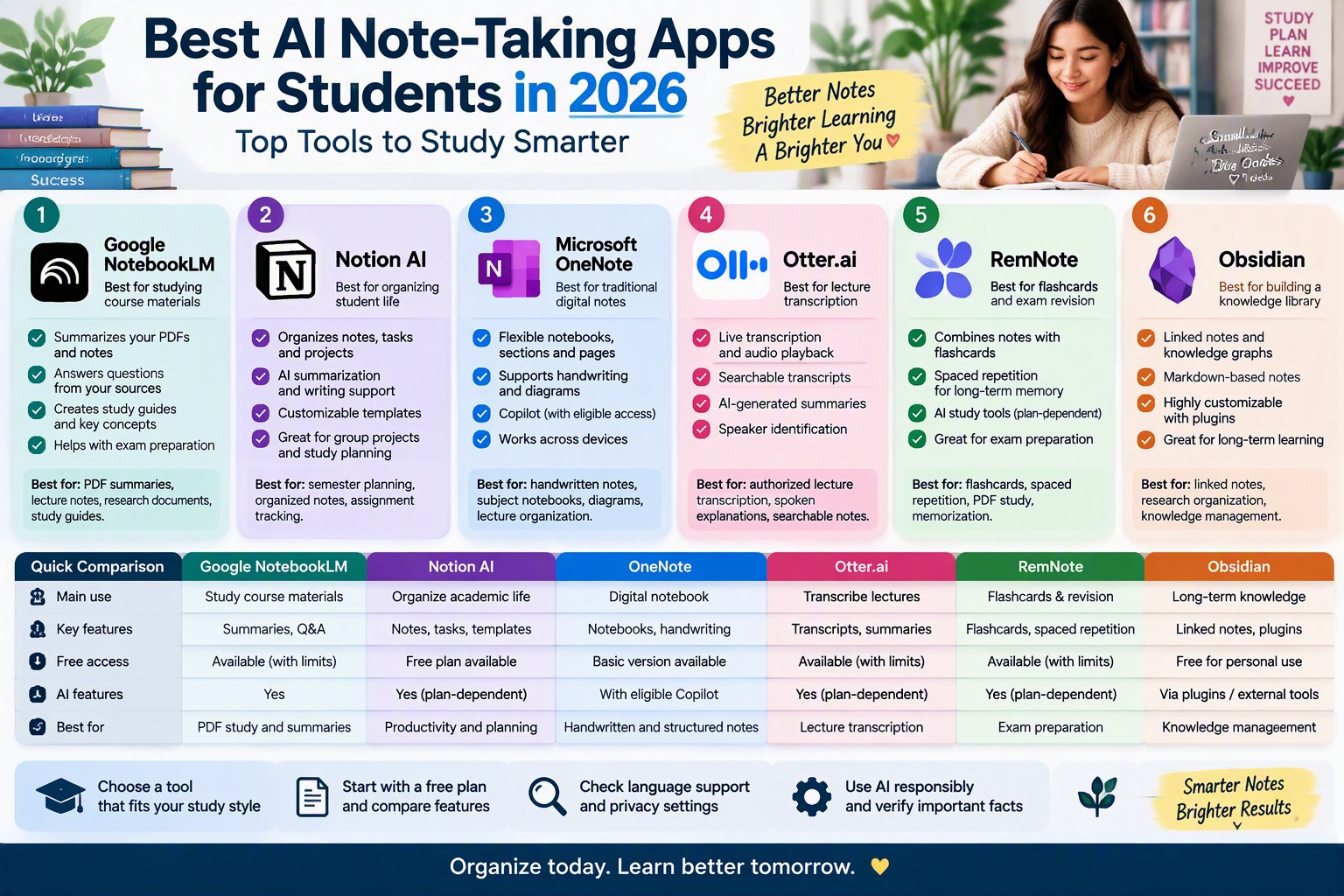
Comparison Table: Best AI Note-Taking Apps for Students in 2026
The following table summarizes the main strengths of the six applications covered in this guide.
| App | Best Use | Main Features | Free Access |
|---|---|---|---|
| Google NotebookLM | Studying from course materials | Source-based answers, summaries, study guides | Available, subject to current limits |
| Notion AI | Organizing academic life | Pages, databases, task management, AI assistance | Free workspace; AI access varies |
| Microsoft OneNote | Traditional digital note-taking | Notebooks, handwriting, sections, pages | Basic note-taking available |
| Otter.ai | Spoken lecture transcription | Live transcription, searchable text, summaries | Available with usage limits |
| RemNote | Exam preparation | Flashcards, spaced repetition, AI study tools | Available, with plan-dependent features |
| Obsidian | Long-term knowledge management | Linked notes, Markdown files, customizable plugins | Core app available for personal use |
Free-plan terms, AI capabilities, and usage limits may change. Check each application’s official website before subscribing.
Which AI Note-Taking App Is Best for Different Types of Students?
The best AI note-taking app depends on the way you study, the materials you use, and the features you need most.
Best for High School Students
Google NotebookLM can help high school students review compatible course documents and create summaries from their own materials. Microsoft OneNote is another useful choice for organizing class notes by subject.
Students who want to memorize definitions and key facts may prefer RemNote because it connects notes with flashcards and revision tools.
The most useful application is one that makes lessons easier to understand without replacing independent learning or the teacher’s explanations.
Best for University Students
University students often need to manage lecture notes, research papers, assignment deadlines, and multiple subjects at once.
Notion is suitable for organizing an entire semester, while NotebookLM can help students explore information from their own research materials. Obsidian is worth considering for those who want to connect ideas across multiple courses and build a long-term knowledge library.
Students who attend lectures that can legally and appropriately be recorded may also benefit from a transcription application such as Otter.ai.
Best for Students Who Prefer Handwriting
Students who learn best by writing formulas, drawing diagrams, or annotating documents may prefer Microsoft OneNote on a compatible touchscreen device.
OneNote supports handwritten content and allows students to combine it with typed notes and images. This makes it useful for mathematics, physics, biology, and other subjects involving diagrams.
A compatible tablet and stylus can make the experience more convenient, but students do not need to buy expensive equipment to begin organizing their notes digitally.
Best for Students Preparing for Exams
RemNote is particularly useful for students who want to connect note-taking with regular revision.
Its flashcards and spaced-repetition features can help learners revisit information over time. NotebookLM is another option for summarizing source materials and generating study questions where those features are available.
For the best results, combine summaries with active recall, practice questions, and independent review.
Best for Students Who Need Lecture Transcripts
Otter.ai is worth considering for students who need searchable text from authorized recordings.
It can help capture spoken explanations and make them easier to review. However, students should always check recording rules, verify the transcript, and make their own study summaries rather than relying entirely on automated output.
Best AI Note-Taking Accessories on Amazon Germany and Europe
AI note-taking applications are generally accessed through official websites or app stores rather than purchased as physical products on Amazon. However, students who prefer digital handwriting or need a dedicated device for reading and annotating course materials may benefit from compatible accessories.
The following Amazon search pages can help you explore related products. Availability, prices, and compatibility vary by seller and country.
1. Tablets for Digital Note-Taking
A tablet can make it easier to annotate PDFs, organize lecture notes, read textbooks, and use compatible note-taking applications. Before buying one, check its operating system, screen size, storage, battery life, and compatibility with the apps you intend to use.
- Tablets for Students on Amazon Germany
- Tablets for Digital Note-Taking on Amazon France
- Tablets for Note-Taking on Amazon Italy
- Tablets for Note-Taking on Amazon Spain
2. Digital Pens and Styluses
A compatible stylus can make handwriting, highlighting, and drawing diagrams easier on a touchscreen. Not every stylus works with every tablet, so check the device model and supported pen technology before purchasing.
- Stylus Pens on Amazon Germany
- Stylus Pens on Amazon France
- Stylus Pens on Amazon Italy
- Stylus Pens on Amazon Spain
3. Digital Notebooks and Reusable Notebooks
Students who prefer writing on paper may consider reusable notebooks or digital writing accessories as a complement to AI-powered study applications. These products do not automatically provide all the AI features described in this article, so check the manufacturer’s specifications before buying.
For AI subscriptions, use the official website of the relevant service to verify current prices, features, and payment options. An Amazon search result for an accessory or study guide should not be treated as proof that an official subscription is available there.
How to Choose the Best AI Note-Taking App for Students
Choosing an application becomes easier when you identify the main problem you want to solve.
Consider Your Note-Taking Style
If you prefer structured pages and handwritten notes, Microsoft OneNote may be a good starting point. If you prefer organizing entire projects and deadlines in one workspace, Notion may suit you better.
Students who study primarily from PDFs and reading materials should consider NotebookLM, while those who need flashcards and scheduled revision may prefer RemNote.
If you want to build a collection of interconnected notes that grows throughout your education, Obsidian may be a better fit.
Compare Free and Paid Features
Many note-taking applications provide a free version, but AI functions may have separate limits or subscription requirements.
Before paying, check how many documents you can process, whether AI summaries are included, how much transcription time is available, and whether the features work on your device.
Start with the free version whenever possible and upgrade only if you identify a specific limitation that affects your studies.
Check Language Support
Language support is particularly important for students who attend lessons in Arabic, English, French, or another language.
Before relying on a transcription tool, confirm that it supports the language spoken in your lectures. Test it with a short, permitted recording or sample before using it for important coursework.
For AI-generated summaries, compare the output with your original notes to make sure that technical terms and important details have been preserved.
Protect Your Privacy
Some applications store notes online or process information using external AI services. Before uploading course documents, review the privacy settings and check whether the material can be shared with the service.
Avoid uploading passwords, sensitive personal information, confidential documents, or private recordings without appropriate authorization.
Students should also follow their school’s rules about recording lessons and sharing educational materials.
How to Use AI Note-Taking Apps More Effectively
The best AI note-taking application is only part of a successful study routine. Students still need to understand, review, and remember the material.
Step 1: Capture Important Information
During a lesson, write down the main ideas, definitions, formulas, examples, and questions that need clarification. Use an approved transcription tool only when recording is permitted.
Do not focus on capturing every single word. Prioritize the concepts that help you understand the subject.
Step 2: Organize Your Notes
After class, organize your notes by subject, topic, and date. Add headings and highlight important concepts so that the information is easier to find later.
An application such as OneNote or Notion can help maintain a consistent structure across different subjects.
Step 3: Generate a Summary
Use an appropriate AI feature to summarize your notes or explain difficult sections. Ask for the main ideas, essential definitions, and relationships between important concepts.
Compare the summary with your original notes to identify missing information or inaccurate explanations.
Step 4: Create Revision Questions
Turn the main concepts into questions that test your understanding. RemNote can help create flashcards, while other AI study tools may be able to generate practice questions from supplied materials.
Try answering the questions without looking at your notes. This helps you identify what you understand and what needs more revision.
Step 5: Review Regularly
Instead of waiting until the day before an examination, revisit important topics at regular intervals.
Use flashcards, practice questions, and short summaries to reinforce what you have learned. Keep the application simple enough that organizing your notes does not become more time-consuming than studying.
Are AI Note-Taking Apps Worth It for Students in 2026?
AI note-taking applications can be useful for students who want to reduce the time spent organizing information and make revision more efficient.
They can help summarize lengthy documents, search through transcripts, create study materials, and keep assignments organized. Some applications are available for free, while others offer advanced features through paid plans.
However, AI tools are not a replacement for understanding the lesson. Summaries may omit important details, and transcripts can contain errors. Students should always compare AI-generated material with reliable course resources and their original notes.
For many learners, beginning with a free tool and building a consistent note-taking routine is more valuable than subscribing to several applications at once.
Conclusion: What Are the Best AI Note-Taking Apps for Students in 2026?
The best AI note-taking apps for students in 2026 offer different ways to organize academic materials, understand lessons, and prepare for examinations. Google NotebookLM is a strong option for studying from personal documents, while Notion is useful for organizing notes, assignments, and an entire semester.
Microsoft OneNote is an excellent choice for traditional digital notebooks and handwritten notes, while Otter.ai can help students review authorized lecture recordings through searchable transcripts. RemNote is particularly useful for flashcards and spaced repetition, and Obsidian suits students who want to build a connected library of knowledge.
For most students, the right choice depends on their learning style and daily requirements. Start with a free option, test its features with real study materials, and choose an application that makes learning easier without adding unnecessary complexity.
Used responsibly, AI note-taking apps can help students organize information, review lessons more effectively, and develop stronger independent study habits.


